
Author: WebShot Designs

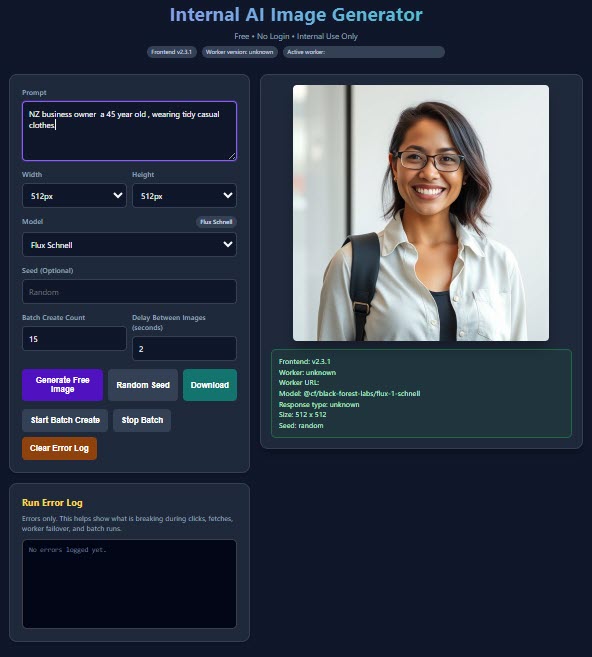
  • Bulk AI image Generation Tool

    Scaling Visual Content Without Slowing Down Your Marketing

    Visual content is no longer optional—it’s essential.

    From websites and social media to ads and product listings, images play a critical role in capturing attention, communicating value, and driving engagement. But creating high-quality visuals consistently can be time-consuming, expensive, and difficult to scale.

    This is where AI bulk image generation becomes a powerful solution.

    Instead of creating visuals one at a time, you can generate large volumes of images quickly, consistently, and strategically—helping your business stay visible and competitive.

    What Is AI Bulk Image Generation?

    AI bulk image generation is the process of creating multiple images at scale using intelligent systems and structured prompts.

    It allows you to:

    Generate batches of images in one workflow
    Maintain consistent styles and themes
    Create visuals for multiple platforms
    Produce variations quickly

    Rather than designing each image manually, you build a system that produces visual content efficiently.

    Why Visual Content Matters More Than Ever

    Before understanding the benefits of bulk generation, it’s important to recognise the role visuals play in your marketing.

    1. Images Capture Attention

    People process visuals faster than text. Strong imagery stops users from scrolling.

    1. Visuals Improve Engagement

    Content with images is more likely to be interacted with and remembered.

    1. Consistency Builds Brand Identity

    A consistent visual style helps your brand feel recognisable and professional.

    1. Every Platform Requires Visual Content

    Websites, social media, ads, and emails all rely heavily on imagery.

    Without a steady flow of visuals, your marketing can feel incomplete.

    The Challenge of Traditional Image Creation

    Creating visuals manually presents several challenges.

    Time-Consuming:
    Designing each image individually takes significant effort.

    Inconsistent Style:
    Without a system, visuals can feel mismatched.

    Limited Output:
    Producing large volumes quickly is difficult.

    High Costs:
    Custom design work can become expensive over time.

    AI bulk image generation solves these problems.

    How AI Bulk Image Generation Works

    The process combines planning with automation.

    Prompt Creation

    You define the style, subject, and purpose of your images.

    Batch Generation

    Multiple images are created in one sequence.

    Variation Control

    You can generate different versions of the same concept.

    Selection and Refinement

    Choose the best outputs and refine them as needed.

    This creates a scalable and repeatable workflow.

    Key Benefits of AI Bulk Image Generation

    When used correctly, it offers significant advantages.

    High Volume Output

    Create dozens or even hundreds of images quickly.

    Consistent Visual Style

    Maintain a unified look across all content.

    Faster Content Production

    Reduce the time required to create visuals.

    Flexibility

    Generate images for different purposes and platforms.

    Scalable Marketing

    Support growing content needs without increasing workload.

    Common Use Cases for Bulk Image Generation

    AI-generated images can be used across many areas of your business.

    Social Media Content

    Create consistent visuals for posts and campaigns.

    Website Graphics

    Enhance pages with relevant and engaging imagery.

    Advertising Creatives

    Generate multiple variations for testing and optimisation.

    Product Visuals

    Create supporting images for listings and promotions.

    Content Marketing

    Pair visuals with blogs and articles to improve engagement.

    Common Mistakes to Avoid

    While powerful, bulk image generation needs to be used strategically.

    Lack of Planning:
    Without clear direction, images can feel random.

    Inconsistent Prompts:
    Poorly structured prompts lead to inconsistent results.

    Overproduction Without Purpose:
    Generating images without a clear use reduces effectiveness.

    Ignoring Brand Identity:
    Visuals should align with your overall style.

    Skipping Review:
    Not all generated images will be suitable—selection is important.

    Avoiding these mistakes ensures better outcomes.

    How to Use AI Image Generation Effectively

    To get the most value, combine automation with strategy.

    Define Your Visual Style

    Establish a consistent look and feel for your brand.

    Plan Your Content Needs

    Know what types of images you need and why.

    Use Structured Prompts

    Clear instructions lead to better results.

    Generate in Batches

    Create multiple images in one session.

    Select and Refine

    Choose the best outputs and improve them if needed.

    Align with Your Content

    Ensure visuals support your messaging.

    Turning Visual Creation into a System

    AI bulk image generation allows you to build a repeatable process.

    Instead of:

    Creating visuals randomly
    Struggling with consistency
    Running out of content

    You create a system that:

    Produces images regularly
    Maintains a consistent style
    Supports your marketing strategy

    This creates efficiency and momentum.

    The Role of Visual Content in Growth

    As your business grows, your content needs increase.

    More campaigns, more platforms, and more engagement all require more visuals.

    AI bulk image generation ensures you can:

    Keep up with demand
    Maintain quality
    Scale your marketing

    Without it, visual content can become a bottleneck.

    The Long-Term Value of AI Image Systems

    Over time, the benefits become even more noticeable.

    You gain:

    A large library of visual assets
    Consistent branding
    Faster content production
    Improved engagement

    Instead of reacting to content needs, you stay ahead of them.

    Why Professional Setup Matters

    While AI tools are accessible, professional setup ensures your system delivers real results.

    This includes:

    Defining visual styles
    Structuring prompts
    Creating workflows
    Ensuring consistency

    Instead of random outputs, you get a system designed to support your marketing.

    Frequently Asked Questions

    1. What is AI bulk image generation?
      It is the process of creating multiple images at scale using intelligent systems.
    2. Why is visual content important?
      It improves engagement, captures attention, and supports your messaging.
    3. Can AI generate high-quality images?
      Yes, when guided with clear structure and prompts.
    4. What can these images be used for?
      Social media, websites, ads, and content marketing.
    5. How do I maintain consistency?
      By using structured prompts and a defined visual style.
    6. Do I need to review generated images?
      Yes, selecting the best outputs ensures quality.
    7. Is bulk image generation suitable for small businesses?
      Yes, it helps scale content without increasing workload.
    8. Is AI image generation a long-term solution?
      Yes, it supports ongoing marketing and growth.
  • AI Bulk Content Creation

    Scaling Your Marketing Output Without Losing Quality

    Content drives visibility, engagement, and growth.

    But for most businesses, the challenge isn’t understanding the importance of content—it’s keeping up with the demand. Blogs, emails, landing pages, product descriptions, and social media posts all require time, consistency, and structure.

    Creating content one piece at a time can quickly become overwhelming.

    This is where AI bulk content creation changes the game.

    Instead of producing content slowly and inconsistently, you can generate large volumes of structured, high-quality content efficiently—while maintaining clarity and purpose.

    What Is AI Bulk Content Creation?

    AI bulk content creation is the process of generating multiple pieces of content at scale using structured systems and intelligent automation.

    It involves:

    Producing multiple blog posts at once
    Creating batches of social media content
    Generating email sequences
    Building large volumes of product descriptions
    Developing landing pages in a structured format

    The goal is not just speed—it’s consistency and scalability.

    Why Businesses Need Bulk Content Creation

    Modern marketing requires ongoing content.

    1. Consistency Drives Results

    Publishing regularly keeps your business visible and relevant.

    1. More Content Increases Reach

    The more content you create, the more opportunities you have to be discovered.

    1. Time Is a Limiting Factor

    Creating content manually at scale is time-consuming.

    1. Multiple Channels Require Content

    You need content for:

    Websites
    Emails
    Social platforms

    1. Growth Requires Systems

    Without a structured approach, content creation becomes inconsistent.

    AI bulk content creation addresses these challenges.

    How AI Bulk Content Creation Works

    The process combines strategy with automation.

    Content Planning

    Topics and themes are defined based on your goals.

    Structured Generation

    Content is created using consistent formats and frameworks.

    Batch Production

    Multiple pieces of content are generated at once.

    Refinement and Optimisation

    Content is reviewed and adjusted to ensure quality.

    This creates a streamlined and efficient workflow.

    Key Benefits of AI Bulk Content Creation

    When implemented correctly, bulk content creation delivers significant advantages.

    Increased Output

    You can produce far more content in less time.

    Consistency Across Channels

    Your messaging remains aligned and structured.

    Reduced Workload

    Automation reduces the time required for content creation.

    Improved Organisation

    Content is planned and produced systematically.

    Scalable Marketing

    Your content strategy can grow alongside your business.

    Common Mistakes to Avoid

    While bulk content creation is powerful, it must be used correctly.

    Prioritising Quantity Over Quality:
    Content should still provide value and clarity.

    Lack of Strategy:
    Without direction, content can become unfocused.

    Inconsistent Tone:
    Your brand voice should remain consistent.

    Skipping Review:
    Editing ensures accuracy and relevance.

    Over-Automation:
    Human input is still important for refinement.

    Avoiding these mistakes ensures better results.

    How Bulk Content Creation Supports Your Marketing

    Bulk content creation is not just about producing more—it’s about improving your overall strategy.

    Stronger Online Presence

    Regular content increases visibility and engagement.

    Better Audience Connection

    Consistent messaging builds familiarity and trust.

    More Opportunities for Conversion

    Each piece of content is a chance to attract and convert users.

    Efficient Use of Resources

    You achieve more without increasing workload.

    Turning Content Creation into a System

    One of the biggest advantages of AI bulk content creation is that it transforms your process into a system.

    Instead of:

    Creating content randomly
    Struggling with consistency
    Reacting to content needs

    You create a structured approach that:

    Plans content in advance
    Produces content in batches
    Maintains consistency

    This creates momentum and stability.

    Practical Tips for Effective Bulk Content Creation

    To maximise results, follow these strategies.

    Start with a Content Plan:
    Define your topics and goals.

    Use Structured Formats:
    Maintain consistency across all content.

    Focus on Value:
    Ensure each piece of content is useful and relevant.

    Maintain Your Brand Voice:
    Keep your tone consistent.

    Batch Your Work:
    Create multiple pieces at once.

    Review and Refine:
    Edit content before publishing.

    AI Bulk Content as a Growth Strategy

    Bulk content creation is not just a tactic—it’s a growth strategy.

    It allows you to:

    Expand your reach
    Maintain consistent visibility
    Support multiple marketing channels
    Scale your efforts efficiently

    This creates a strong foundation for long-term success.

    The Long-Term Value of AI Bulk Content Creation

    Over time, the benefits compound.

    You gain:

    A large library of content
    Increased visibility
    Better engagement
    A scalable marketing system

    Instead of struggling to keep up, you build a system that works continuously.

    Why Professional Setup Matters

    While AI tools are widely available, professional setup ensures your content strategy is effective.

    This includes:

    Strategic planning
    Structured workflows
    Consistent messaging
    Ongoing optimisation

    Instead of random output, you get a system designed to deliver results.

    Frequently Asked Questions

    1. What is AI bulk content creation?
      It is the process of generating large volumes of content using structured systems.
    2. Why is bulk content important?
      It helps maintain consistency and increase visibility.
    3. Can AI create high-quality content?
      Yes, when combined with strategy and refinement.
    4. What types of content can be created?
      Blogs, emails, social posts, and product descriptions.
    5. Do I still need to edit the content?
      Yes, editing ensures accuracy and quality.
    6. Is bulk content suitable for small businesses?
      Yes, it helps scale marketing efforts efficiently.
    7. How do I maintain consistency?
      By using structured formats and clear guidelines.
    8. Is AI bulk content a long-term solution?
      Yes, it supports ongoing growth and marketing success.
  • Website Redesign & Modernisation: Turning Your Existing Site into a High-Performing Business Asset

    Your website might already exist—but is it actually working for your business?

    Many businesses reach a point where their website no longer reflects who they are, what they offer, or how customers behave today. What once felt modern can quickly become outdated, slow, and ineffective. This is where website redesign and modernisation comes in.

    Rather than starting from scratch blindly, redesigning and modernising your website is a strategic process. It’s about improving what works, fixing what doesn’t, and aligning your online presence with how people expect to interact with businesses right now.
    What Website Redesign & Modernisation Really Means

    Website redesign is not just a visual refresh. It’s a complete rethink of how your website looks, functions, and performs.

    Modernisation goes even further. It ensures your site is built to meet current standards in:
    User experience
    Mobile responsiveness
    Speed and performance
    Search visibility
    Conversion-focused design

    Together, redesign and modernisation transform your website from something static into something that actively supports your business growth.
    Why Businesses Outgrow Their Websites

    It’s completely normal for a website to become outdated over time. Your business evolves—but your website often doesn’t keep up.

    Here are some common reasons businesses need a redesign.
    Your Website Looks Outdated

    Design trends change, but more importantly, user expectations change. What felt modern five years ago may now feel clunky or unprofessional.

    An outdated website can:
    Reduce trust
    Lower engagement
    Make your business appear behind the times
    Poor Mobile Experience

    If your website wasn’t built with mobile users in mind, it likely struggles on smaller screens.

    This can lead to:
    Hard-to-read text
    Buttons that are difficult to tap
    Layouts that don’t adjust properly

    With mobile usage dominating, this is one of the biggest reasons to modernise.
    Slow Loading Speeds

    Older websites often suffer from poor performance due to outdated structures, heavy files, or inefficient design.

    Slow websites cause users to leave quickly—and they can also impact visibility in search results.
    Low Conversion Rates

    If your website isn’t generating enquiries, sales, or leads, something isn’t working.

    This could be due to:
    Confusing navigation
    Weak messaging
    Poor layout structure
    Lack of clear calls-to-action
    Difficult to Update or Manage

    Many older websites are hard to maintain. Adding new content or making changes may feel complicated or time-consuming.

    Modern websites are built with flexibility in mind, allowing easy updates as your business grows.
    The Real Benefits of Redesigning Your Website

    A well-executed redesign can have a significant impact on your business—not just visually, but practically.
    Improved First Impressions

    A modern, clean design instantly builds trust. Visitors are more likely to stay, explore, and engage when your website feels current and professional.
    Better User Experience

    Redesign focuses on making your website easier to use. Clear navigation, logical structure, and intuitive layouts help visitors find what they need quickly.
    Increased Conversions

    Modern websites are designed with purpose. Every section guides users toward taking action—whether that’s making contact, requesting a quote, or completing a purchase.
    Faster Performance

    Optimised design and structure result in faster load times, keeping users engaged and reducing bounce rates.
    Stronger Brand Presence

    A redesign ensures your website reflects your current branding, messaging, and business direction.
    Key Elements of a Successful Website Redesign

    A redesign isn’t about changing everything—it’s about improving strategically.
    Clear Strategy Before Design

    Before any design work begins, it’s important to understand:
    Your business goals
    Your target audience
    What your current website is lacking

    Without this clarity, redesign can become purely cosmetic.
    Simplified Structure

    Modern websites prioritise simplicity. This means:
    Fewer distractions
    Clear page hierarchy
    Logical navigation

    The goal is to make the user journey effortless.
    Mobile-First Design

    Instead of designing for desktop first, modern websites are built with mobile users as the priority.

    This ensures the experience works perfectly where most users are browsing.
    Strong Visual Hierarchy

    Design should guide attention naturally. Important elements—like headings, buttons, and key messages—should stand out clearly.
    Consistent Branding

    Colours, fonts, and overall style should align with your business identity, creating a cohesive and recognisable look.
    Conversion-Focused Layouts

    Every page should have a clear purpose. Strategic placement of calls-to-action helps turn visitors into customers.
    Signs It’s Time for a Website Redesign

    Not sure if you need a redesign? Here are clear indicators:
    Your website looks outdated compared to competitors
    It doesn’t work well on mobile devices
    It loads slowly
    You’re not getting enquiries or leads
    It’s difficult to update or manage
    Your branding has changed but your website hasn’t

    If you recognise even a few of these, it’s likely time to modernise.
    Common Mistakes to Avoid During Redesign

    A redesign can be powerful—but only if done correctly.

    Focusing Only on Appearance:
    Design is important, but function matters more. A beautiful site that doesn’t convert won’t help your business.

    Ignoring Existing Data:
    Your current website provides valuable insights. Understanding what works and what doesn’t is crucial.

    Overcomplicating the Design:
    Adding too many features or elements can overwhelm users. Simplicity is key.

    Not Thinking About Content:
    Design and content work together. Clear, concise messaging is just as important as layout.

    Forgetting About Speed:
    Heavy visuals and unnecessary elements can slow your site down.
    How Redesign & Modernisation Boost Your Marketing

    Your website sits at the centre of your marketing efforts. Improving it amplifies everything else you do.
    Better Return on Marketing Efforts

    If your website converts more visitors, every marketing channel becomes more effective.
    Improved Search Performance

    Modern websites are structured in ways that support better visibility in search results.
    Stronger User Engagement

    A smoother experience keeps users on your site longer, increasing the chances of conversion.
    Consistent Brand Experience

    A redesigned website ensures your messaging and visuals align across all platforms.
    Practical Tips for a Successful Website Modernisation

    If you’re planning a redesign, keep these tips in mind:

    Audit Your Current Website:
    Identify what works, what doesn’t, and where users drop off.

    Define Clear Goals:
    Know what success looks like—more leads, better engagement, or increased sales.

    Prioritise User Experience:
    Design for your audience, not just your preferences.

    Keep Navigation Simple:
    Make it easy for users to find information quickly.

    Focus on Speed and Performance:
    Optimise everything to ensure fast loading times.

    Think Long-Term:
    Build a website that can grow with your business.
    The Long-Term Value of Website Redesign

    A modernised website is not just a short-term improvement—it’s a long-term investment.

    Over time, it continues to:
    Attract new customers
    Improve conversion rates
    Strengthen your brand
    Support your marketing efforts

    Rather than constantly patching an outdated site, a well-executed redesign gives you a solid foundation for future growth.


    Frequently Asked Questions
    What is the difference between a website redesign and a rebuild?
    A redesign improves the look, structure, and performance of your existing site, while a rebuild often involves creating a completely new site from scratch.
    How often should a website be redesigned?
    Most websites benefit from a redesign every few years to stay aligned with current standards and user expectations.
    Will I lose my content during a redesign?
    No, existing content can be updated and integrated into the new design where appropriate.
    Can a redesign improve my website’s performance?
    Yes, redesigning can significantly improve speed, usability, and conversion rates.
    How long does a website redesign take?
    The timeline depends on the size and complexity of the project, but it typically takes several weeks.
    Do I need to redesign my website if it still works?
    If it’s not generating results or meeting current standards, a redesign can greatly improve its effectiveness.
    Will my website work better on mobile after redesign?
    Yes, modernisation ensures your site is fully responsive and optimised for mobile users.
    Is website redesign worth the investment?
    Absolutely. A well-designed website continues to deliver value by attracting and converting customers over time.

  • Website Design (NZ Small Businesses): Building a Digital Presence That Actually Works

    For small businesses across New Zealand, a website is no longer just a “nice to have”—it’s the foundation of how customers discover, evaluate, and choose you. Whether you’re running a local service, an online store, or a growing company, your website acts as your digital storefront, salesperson, and first impression all at once.

    But here’s the reality: not all websites are created equal.

    Some websites simply exist. Others actively bring in leads, build trust, and convert visitors into customers. The difference comes down to thoughtful, strategic website design—built specifically with small businesses in mind.
    What Website Design for NZ Small Businesses Really Means

    Website design for small businesses isn’t about flashy visuals or unnecessary complexity. It’s about creating a practical, effective, and easy-to-use online presence that supports real business goals.

    This includes:
    Clear messaging that explains what you do
    Simple navigation that helps users find information quickly
    Mobile-friendly layouts that work on all devices
    Fast loading speeds to keep visitors engaged
    Strategic structure designed to generate enquiries or sales

    For New Zealand businesses, there’s also an added layer—understanding local audiences, expectations, and how people search for services in your area.

    A well-designed website reflects not just your business, but how your customers think and behave.
    Why NZ Small Businesses Need Professional Website Design

    Many small businesses start with basic websites or DIY solutions. While this might get you online quickly, it often falls short when it comes to performance.

    Here’s why investing in professional website design makes a real difference.
    Your Website Is Often Your First Impression

    Before someone contacts you, visits your location, or requests a quote, they will almost always check your website.

    If your site looks outdated, confusing, or difficult to use, visitors may assume the same about your business.

    A professionally designed website instantly communicates:
    Trustworthiness
    Professionalism
    Attention to detail

    These qualities directly influence whether someone chooses you or a competitor.
    Local Customers Expect Simplicity and Clarity

    New Zealand customers tend to value straightforward, no-nonsense communication. They want to quickly understand:
    What you offer
    Where you operate
    How to contact you

    A well-designed website removes friction and makes these answers obvious within seconds.
    Mobile Usage Is Dominant

    A large portion of local searches happen on mobile devices. People are often looking for services while on the go.

    If your website doesn’t work smoothly on mobile, you risk losing a significant share of potential customers.

    Professional website design ensures:
    Responsive layouts
    Easy-to-tap buttons
    Readable text on smaller screens
    A Good Website Supports Your Marketing

    Your website isn’t separate from your marketing—it’s the centre of it.

    Whether people find you through search engines, social platforms, or referrals, they will land on your website. If it doesn’t convert, your marketing efforts lose impact.

    A well-designed website supports your marketing by:
    Capturing enquiries
    Guiding users toward action
    Reinforcing your messaging
    Competing Locally Requires Standing Out

    Even in smaller towns or niche industries, competition exists. Often, customers will compare several businesses before making a decision.

    A clean, modern website helps you stand out by:
    Looking more professional
    Being easier to use
    Providing a better overall experience
    Key Features of an Effective Small Business Website

    To truly work for your business, your website needs more than just good looks. It must be structured with purpose.
    Clear Homepage Messaging

    Visitors should instantly understand what your business does and who it’s for. Avoid vague or overly complicated descriptions.

    A strong homepage includes:
    A clear headline
    A short explanation of your services
    A visible call-to-action
    Simple Navigation

    Menus should be easy to follow, with logical page names and structure. Visitors shouldn’t need to guess where to click.
    Service-Focused Pages

    Each core service should have its own page, explaining:
    What it includes
    Who it’s for
    Why it’s valuable

    This not only helps users but also improves visibility in search results.
    Contact and Enquiry Options

    Make it easy for people to reach you. Include:
    Clear contact details
    Simple enquiry forms
    Prominent call-to-action buttons
    Trust-Building Elements

    Small businesses benefit greatly from building trust quickly. This can be achieved through:
    Testimonials
    Clear business information
    Consistent branding
    Fast Performance

    Speed matters. If your website takes too long to load, visitors will leave before even seeing your content.
    Common Website Mistakes Small Businesses Make

    Understanding what not to do is just as important as knowing what works.

    Overloading the Homepage:
    Too much information can overwhelm visitors. Focus on clarity and simplicity.

    Outdated Design:
    An old-looking website can damage credibility, even if your business is excellent.

    No Clear Call-to-Action:
    If users don’t know what to do next, they won’t take action.

    Ignoring Mobile Users:
    A site that works only on desktop is no longer acceptable.

    Slow Load Times:
    Heavy images and poor structure can drive users away quickly.

    A professional website design process helps avoid these pitfalls from the start.
    How Website Design Helps Generate More Leads

    A well-designed website doesn’t just look good—it actively works to grow your business.
    Guiding User Behaviour

    Through layout and structure, a website can guide users toward specific actions, such as:
    Requesting a quote
    Booking a service
    Making contact
    Reducing Friction

    The easier it is to use your website, the more likely visitors are to stay and engage.
    Building Confidence

    Clear design, consistent branding, and easy navigation all contribute to a sense of trust, which is essential for conversion.
    Supporting Search Visibility

    Well-structured websites tend to perform better in search results, helping more people find your business organically.
    Tips for NZ Small Businesses Planning a New Website

    If you’re considering a new website or redesign, here are some practical tips to get the best results.

    Start with Your Goals:
    Decide what you want your website to achieve—more enquiries, more sales, or increased awareness.

    Think About Your Customer:
    Design your site around their needs, not just your preferences.

    Keep It Simple:
    Clarity always beats complexity. Focus on what matters most.

    Prioritise Mobile Experience:
    Ensure your website works perfectly on all devices.

    Use Clear, Direct Language:
    Avoid jargon. Speak in a way your customers understand.

    Plan for Growth:
    Your website should be flexible enough to evolve as your business grows.
    The Long-Term Value of Good Website Design

    A well-designed website is an investment, not an expense. Over time, it continues to deliver value by:
    Attracting new customers
    Supporting your marketing efforts
    Strengthening your brand
    Improving customer experience

    For small businesses in New Zealand, this can make a significant difference in both visibility and growth.

    Your website becomes more than just an online presence—it becomes a reliable, consistent tool that works for your business every day.


    Frequently Asked Questions
    Why is website design important for small businesses in New Zealand?
    A well-designed website helps build trust, attract local customers, and convert visitors into enquiries or sales.
    How do I know if my current website needs updating?
    If your site looks outdated, loads slowly, or doesn’t generate leads, it may need a redesign.
    Will my website work on mobile devices?
    Professional website design ensures your site is fully responsive and works smoothly on all screen sizes.
    What should a small business website include?
    Key elements include clear messaging, service pages, contact options, and a user-friendly layout.
    How long does it take to build a website?
    The timeline varies depending on complexity, but most projects take a few weeks to complete.
    Can a good website help me get more customers?
    Yes, a well-designed website improves user experience and increases the chances of converting visitors into customers.
    Do I need technical knowledge to manage my website?
    No, most modern websites are designed to be easy to update and manage without technical skills.
    Is website design a one-time process?
    No, websites benefit from regular updates and improvements to stay effective and relevant.

  • Web Designer: Why Your Business Needs One More Than Ever

    In today’s digital-first world, your website is often the very first interaction someone has with your business. Before a phone call, before a visit, before a purchase—people will almost always look you up online. And what they find in those first few seconds shapes their perception instantly. This is where a professional web designer becomes not just helpful, but essential.

    A web designer is far more than someone who “makes a website look nice.” They are responsible for creating a seamless blend of design, functionality, usability, and strategy. Their role sits at the intersection of creativity and business thinking—ensuring that your website doesn’t just exist, but actually works for you.
    What a Web Designer Really Does

    At its core, web design is about creating digital experiences that guide users toward a goal. That goal could be making a purchase, booking a service, filling out a form, or simply learning more about what you offer.

    A skilled web designer focuses on several key areas:

    Visual Design:
    This includes layout, colour schemes, typography, and imagery. Everything is crafted to reflect your brand identity and create a strong first impression.

    User Experience (UX):
    How easy is it for someone to navigate your site? Can they find what they need quickly? A web designer ensures the journey feels natural and intuitive.

    User Interface (UI):
    This is the practical side of interaction—buttons, menus, forms, and other elements that users click or tap. Good UI design reduces friction and encourages action.

    Responsive Design:
    Your site must look and function perfectly across all devices—desktop, tablet, and mobile. A web designer ensures consistency and usability everywhere.

    Conversion-Focused Layouts:
    Beyond aesthetics, a designer structures your site to guide users toward taking action. This could mean strategically placed call-to-action sections, simplified navigation, or clear messaging.
    Why Your Business Needs a Web Designer

    Many businesses start with a basic website, often built quickly or using generic templates. While this may get you online, it rarely delivers real results. A professional web designer transforms your website into a powerful business tool.
    First Impressions Matter More Than Ever

    People make snap judgments within seconds of landing on your website. If your site looks outdated, cluttered, or difficult to use, visitors are likely to leave immediately.

    A professionally designed website communicates trust, credibility, and professionalism. It tells your audience that you care about quality—and by extension, that you’ll care about them.
    Better User Experience Leads to More Conversions

    A beautiful website that confuses users won’t perform well. Design must support function. A web designer ensures that visitors can easily:
    Understand what you offer
    Navigate your pages
    Take action without confusion

    When users feel comfortable and guided, they are far more likely to convert into customers.
    Mobile Optimization Is No Longer Optional

    A large portion of web traffic now comes from mobile devices. If your site doesn’t work well on smaller screens, you’re losing potential customers every day.

    A web designer ensures your site adapts seamlessly across devices, maintaining both usability and visual appeal.
    Strong Branding Builds Recognition

    Your website should reflect your brand clearly and consistently. Colours, fonts, layout, and tone all contribute to how people perceive your business.

    A web designer aligns these elements to create a cohesive identity that sticks in people’s minds and builds long-term recognition.
    Faster Load Times Improve Performance

    Design isn’t just about visuals—it also impacts speed. Poorly structured websites with oversized images or inefficient layouts can slow down loading times.

    A web designer optimizes your site so it loads quickly, keeping users engaged and improving overall performance.
    Designed for Growth and Scalability

    As your business grows, your website should grow with it. A web designer builds a structure that allows for easy updates, additional pages, and new features without needing a complete rebuild.
    Key Elements of an Effective Website Design

    To truly understand the value of a web designer, it helps to look at what makes a website effective.
    Clear and Simple Navigation

    Visitors should never feel lost. A well-designed menu structure ensures users can find what they need in just a few clicks.
    Strong Visual Hierarchy

    Important information should stand out. A web designer uses size, spacing, and contrast to guide attention naturally.
    Engaging but Focused Layout

    A good design avoids clutter. Every section has a purpose, and unnecessary elements are removed to keep the experience clean and focused.
    Consistent Design Language

    From colours to button styles, consistency builds familiarity and trust. It also makes the site easier to use.
    Strategic Call-to-Actions

    Buttons and prompts should be placed where users naturally look, encouraging them to take the next step.
    Readable Typography

    Text should be easy to read on all devices. A web designer carefully selects font sizes, spacing, and contrast to enhance readability.
    Common Mistakes a Web Designer Helps You Avoid

    Without professional guidance, it’s easy to fall into design traps that harm your website’s effectiveness.

    Overcomplicating the Design:
    Too many elements can overwhelm users. Simplicity often performs better.

    Ignoring Mobile Users:
    Designing only for desktop can lead to a poor mobile experience.

    Slow Load Speeds:
    Heavy images and unoptimized layouts can drive visitors away.

    Unclear Messaging:
    If users don’t quickly understand what you offer, they won’t stay.

    Poor Navigation:
    Confusing menus or hidden pages frustrate users and increase bounce rates.

    A web designer anticipates and avoids these issues from the start.
    The Business Impact of Good Web Design

    Investing in a web designer isn’t just about having a better-looking site—it directly impacts your business performance.
    Increased Trust and Credibility

    A professional design builds confidence. People are more likely to engage with a business that appears polished and reliable.
    Higher Conversion Rates

    When your site is easy to use and clearly structured, more visitors turn into customers.
    Improved Search Visibility

    While design is not the only factor, well-structured websites tend to perform better in search rankings due to better usability and performance.
    Better Customer Experience

    A smooth, enjoyable website experience encourages users to stay longer, explore more, and return in the future.
    Stronger Competitive Edge

    In crowded markets, your website can be the deciding factor between you and a competitor. A well-designed site helps you stand out.
    Tips for Getting the Most Out of a Web Designer

    If you’re working with a web designer, your input still matters. Here’s how to get the best results:

    Be Clear About Your Goals:
    Know what you want your website to achieve—sales, leads, bookings, or awareness.

    Understand Your Audience:
    Think about who your customers are and what they need from your site.

    Keep Content Focused:
    Clear, concise messaging works better than long, complicated text.

    Trust the Process:
    A web designer brings expertise—be open to suggestions that improve performance.

    Plan for the Future:
    Consider how your site may evolve and ensure it’s built with flexibility in mind.
    The Future of Web Design

    Web design continues to evolve rapidly. Trends shift, technology improves, and user expectations grow. However, the core principles remain the same—clarity, usability, and purpose.

    Modern web design is increasingly focused on:
    Minimalist layouts that reduce distraction
    Faster performance across all devices
    Personalised user experiences
    Seamless integration with digital marketing strategies

    A skilled web designer stays ahead of these changes, ensuring your website remains effective over time.


    Frequently Asked Questions
    What is the difference between a web designer and a developer?
    A web designer focuses on the visual layout and user experience, while a developer builds the technical functionality behind the scenes.
    How do I know if my website needs redesigning?
    Signs include outdated design, poor mobile performance, slow loading speeds, and low conversion rates.
    Can a web designer help improve my website’s performance?
    Yes, a web designer optimizes layout, usability, and speed, all of which contribute to better performance.
    How long does it take to design a website?
    It depends on complexity, but most projects range from a few weeks to a couple of months.
    Do I need a web designer if I already have a website?
    If your current site isn’t generating results or feels outdated, a web designer can significantly improve its effectiveness.
    Will my website work on mobile devices?
    A professional web designer ensures your site is fully responsive and works smoothly on all screen sizes.
    What should I prepare before working with a web designer?
    Have a clear idea of your goals, your target audience, and any content or branding elements you want included.
    Is web design important for small businesses?
    Absolutely. A strong online presence is essential for attracting and converting customers, regardless of business size.

  • AI Powered Customer Support Tools: Delivering Faster, Smarter, and Scalable Customer Experiences

    Customer expectations have changed dramatically.

    People no longer accept slow replies, limited hours, or inconsistent service. They expect fast, accurate, and helpful responses—whenever they reach out.

    For many businesses, meeting these expectations with traditional methods is difficult. As enquiries grow, so does the pressure on time, staff, and systems.

    This is where AI powered customer support tools are transforming how businesses operate.

    Instead of relying entirely on manual responses, these tools create a smarter, more efficient support system that works continuously in the background.
    What Are AI Powered Customer Support Tools?

    AI powered customer support tools are systems that use intelligent automation to handle customer interactions, assist with enquiries, and improve support processes.

    They can:
    Respond to common questions instantly
    Assist customers in real time
    Route enquiries to the right place
    Provide consistent, accurate information
    Support both customers and internal teams

    These tools are designed to enhance—not replace—your customer support.
    Why AI Support Tools Matter for Your Business

    As your business grows, so does the volume of customer communication.
    Customers Expect Instant Responses

    Delays can lead to frustration and lost opportunities. AI tools provide immediate replies, keeping customers engaged.
    Support Volume Increases Over Time

    More customers means more enquiries. Without systems in place, this can quickly become overwhelming.
    Consistency Is Key

    Customers expect reliable and accurate information every time they interact with your business.
    Time Is Limited

    Handling repetitive questions manually takes time away from higher-value tasks.
    Competitive Advantage

    Businesses that respond faster and more efficiently stand out.
    Key Features of AI Powered Support Tools

    To deliver real value, these tools need to be properly structured.
    Instant Response Capability

    Providing immediate answers to common enquiries.
    Intelligent Routing

    Directing more complex issues to the appropriate person or system.
    24/7 Availability

    Supporting customers at any time, regardless of business hours.
    Consistent Messaging

    Ensuring responses are accurate and aligned with your business.
    Data Insights

    Tracking interactions to identify trends and opportunities for improvement.
    Common Challenges Without AI Support

    Many businesses struggle with customer support due to a lack of systems.

    Slow Response Times:
    Delayed replies reduce customer satisfaction.

    Missed Enquiries:
    Without proper tracking, some messages go unanswered.

    Inconsistent Information:
    Different responses create confusion.

    Overloaded Teams:
    Staff become overwhelmed with repetitive tasks.

    Limited Availability:
    Support is restricted to working hours.

    AI powered tools help eliminate these issues.
    How AI Improves Customer Support Performance

    Implementing AI tools leads to measurable improvements.
    Faster Response Times

    Customers receive answers instantly, improving their experience.
    Increased Efficiency

    Routine tasks are handled automatically, freeing up time.
    Better Customer Satisfaction

    Consistent and timely responses create a positive impression.
    Scalable Support

    Your support system can handle more enquiries without additional strain.
    Balancing Automation and Human Interaction

    One of the biggest misconceptions is that AI replaces human support.

    In reality, the best systems combine both.
    AI Handles Routine Tasks

    Common questions and simple interactions are managed automatically.
    Humans Handle Complex Issues

    More detailed or sensitive enquiries are handled by your team.

    This balance ensures efficiency without losing the human touch.
    Practical Tips for Implementing AI Support Tools

    To get the best results, it’s important to approach implementation strategically.

    Start with Common Enquiries:
    Identify frequently asked questions and automate those first.

    Define Clear Processes:
    Ensure the system knows when to respond and when to escalate.

    Keep Responses Clear and Helpful:
    Focus on providing useful, easy-to-understand answers.

    Align with Your Brand Voice:
    Maintain a consistent tone across all interactions.

    Monitor Performance:
    Review how the system is performing and refine it over time.
    AI Support as Part of Your Business System

    Customer support should not be treated as a separate function—it’s part of your overall business experience.

    AI tools help integrate support into a structured system that:
    Handles enquiries efficiently
    Maintains consistency
    Improves organisation
    Enhances customer satisfaction

    This creates a smoother and more reliable operation.
    The Long-Term Value of AI Powered Support

    Over time, AI support tools become a key asset.

    They help you:
    Save time
    Reduce operational pressure
    Improve customer experience
    Scale your business

    Instead of reacting to every enquiry manually, you create a system that works continuously.
    Why Professional Setup Matters

    While basic tools can be implemented quickly, professional setup ensures they deliver real results.

    This includes:
    Strategic configuration
    Accurate response design
    Seamless integration
    Ongoing optimisation

    Instead of a simple tool, you get a system that enhances your entire support process.


    Frequently Asked Questions
    What are AI powered customer support tools?
    They are systems that use automation to handle customer interactions and improve support processes.
    Can AI replace human customer support?
    No, it supports and enhances human interaction rather than replacing it.
    What types of enquiries can AI handle?
    Common questions, basic support requests, and initial interactions.
    Is AI support available 24/7?
    Yes, it operates continuously.
    Can it improve response times?
    Yes, it provides instant replies to customer enquiries.
    Is it suitable for small businesses?
    Yes, it helps manage support efficiently without requiring large teams.
    How do I know what to automate?
    Start with repetitive and time-consuming tasks.
    Is AI support a long-term solution?
    Yes, it supports ongoing growth and improves efficiency over time.

  • Recruiter: Why Your Website Is Your Most Powerful Hiring Tool

    Finding the right people for your business has never been more competitive. Whether you’re hiring your first team member or expanding a growing company, attracting quality candidates is no longer just about posting a job listing—it’s about how your business presents itself online.

    Before applying, most candidates will visit your website. What they see, how it feels, and how easy it is to engage can determine whether they apply—or move on to another opportunity.

    This is where a recruiter-focused website strategy becomes essential.

    Your website isn’t just for customers. It’s one of your most powerful recruitment tools.
    What “Recruiter” Means in a Website Context

    When we talk about “Recruiter” as a service in website design, we’re not referring to a person—we’re talking about building your website to actively attract, engage, and convert potential candidates.

    This includes:
    Creating a careers or jobs section
    Showcasing your company culture
    Making it easy to apply for roles
    Structuring content to appeal to the right candidates
    Ensuring a smooth and professional experience

    A recruiter-focused website turns passive visitors into active applicants.
    Why Your Website Matters for Recruitment

    Many businesses rely solely on external platforms to find candidates. While these can generate visibility, they often lack control and personalisation.

    Your website gives you full control over how your business is presented.
    First Impressions Influence Applications

    Candidates don’t just apply based on a job description—they evaluate the company behind it.

    Your website answers key questions:
    What kind of company is this?
    Do they look professional?
    Would I want to work here?

    A well-designed website builds confidence and encourages applications.
    Attract the Right Candidates

    Not all applicants are the right fit. Your website helps filter candidates by clearly communicating:
    Your values
    Your expectations
    Your work environment

    This leads to higher-quality applications.
    Strengthen Your Employer Brand

    Your employer brand is how people perceive your business as a place to work.

    A strong website reinforces:
    Credibility
    Professionalism
    Culture

    This makes your business more attractive to potential hires.
    Simplify the Application Process

    If applying is difficult or confusing, candidates may give up.

    Your website can streamline this process, making it easy for candidates to take the next step.
    Stand Out in a Competitive Market

    Many businesses overlook their website as a recruitment tool. By investing in it, you gain a competitive advantage.
    Key Elements of a Recruitment-Focused Website

    To effectively attract candidates, your website needs specific features and structure.
    Dedicated Careers Page

    A careers section is essential. It should clearly outline:
    Available roles
    What each role involves
    How to apply

    This creates a central place for all recruitment activity.
    Clear Job Descriptions

    Each role should be easy to understand, with clear expectations and responsibilities.

    Avoid overly complex language—clarity attracts better candidates.
    Company Culture and Values

    Candidates want to know what it’s like to work for your business.

    Your website should communicate:
    Your mission
    Your values
    Your working environment
    Simple Application Process

    The easier it is to apply, the more likely candidates will complete the process.

    This includes:
    Short, clear forms
    Easy navigation
    Minimal unnecessary steps
    Mobile-Friendly Design

    Many candidates browse job opportunities on mobile devices. Your website must work seamlessly on all screen sizes.
    Professional and Consistent Design

    A polished website reflects a professional organisation, which builds trust with potential applicants.
    Common Recruitment Website Mistakes

    Even well-intentioned websites can fail to attract candidates if certain mistakes are made.

    No Careers Section:
    Without a dedicated area, candidates don’t know where to look.

    Complicated Application Forms:
    Long or confusing forms can discourage applicants.

    Outdated Job Listings:
    Old or irrelevant roles reduce credibility.

    Lack of Information About the Company:
    Candidates need context, not just job details.

    Poor Mobile Experience:
    If the site doesn’t work on mobile, many candidates won’t apply.

    Avoiding these mistakes can significantly improve your recruitment results.
    How a Recruiter-Focused Website Improves Hiring

    A well-structured website doesn’t just attract more candidates—it attracts better ones.
    Higher Quality Applications

    Clear messaging and structure help ensure that applicants understand the role and expectations.
    Faster Hiring Process

    When candidates are well-informed, the recruitment process becomes more efficient.
    Reduced Reliance on External Platforms

    Your website becomes a central hub for recruitment, reducing dependence on third-party channels.
    Stronger Employer Brand

    A professional online presence builds long-term credibility as an employer.
    Tips for Building an Effective Recruitment Website

    If you want your website to support hiring, focus on these practical strategies.

    Be Clear and Transparent:
    Provide honest and straightforward information about roles and expectations.

    Highlight What Makes You Unique:
    Explain why someone should choose to work for your business.

    Keep the Process Simple:
    Make it easy to apply without unnecessary steps.

    Update Regularly:
    Ensure all job listings and information are current.

    Focus on User Experience:
    Candidates should be able to navigate and apply without confusion.

    Optimise for Mobile:
    Ensure the entire process works smoothly on phones and tablets.
    Turning Your Website into a Recruitment Engine

    Your website has the potential to do more than just support your business—it can actively drive growth by helping you build the right team.

    By focusing on recruitment, you create a system that:
    Attracts candidates consistently
    Filters for quality
    Simplifies the hiring process
    Strengthens your brand

    Instead of relying solely on external channels, your website becomes a reliable source of talent.
    The Long-Term Value of Recruitment-Focused Design

    Investing in your website as a recruitment tool delivers long-term benefits.

    It helps you:
    Build a strong employer reputation
    Attract better candidates
    Reduce hiring time
    Improve overall business performance

    Over time, your website becomes an essential part of how your business grows and evolves.
    Why Professional Setup Matters

    While basic job listings can be added to a website, creating an effective recruitment system requires thoughtful design and structure.

    Professional setup ensures:
    Clear and engaging presentation
    Optimised user experience
    Efficient application processes
    Alignment with your business goals

    Instead of simply listing jobs, your website becomes a strategic tool for attracting and hiring the right people.


    Frequently Asked Questions
    What does a recruitment-focused website do?
    It helps attract, engage, and convert potential candidates into applicants.
    Do I need a careers page on my website?
    Yes, it provides a central place for job listings and recruitment information.
    How can my website attract better candidates?
    By clearly communicating your values, roles, and expectations.
    Should the application process be simple?
    Yes, a straightforward process increases the likelihood of completed applications.
    Can my website replace external job platforms?
    It can reduce reliance on them by becoming a primary recruitment channel.
    How important is mobile optimisation for recruitment?
    Very important, as many candidates browse and apply using mobile devices.
    How often should I update job listings?
    Regularly, to ensure all information is accurate and relevant.
    Is a professional website necessary for hiring?
    Yes, it builds trust, improves candidate experience, and supports better hiring outcomes.

  • AI Chatbot Setup for Websites: Turning Visitors into Conversations, and Conversations into Customers

    Every website has one goal—turn visitors into action.

    But here’s the reality: most visitors don’t convert on their first visit. They browse, hesitate, have questions, and often leave without taking the next step.

    What if your website could respond instantly, answer questions, guide users, and keep them engaged—without you being there?

    This is exactly what AI chatbot setup for websites makes possible.

    Instead of a static experience, your website becomes interactive, responsive, and capable of turning passive visitors into active conversations.
    What Is an AI Chatbot for Websites?

    An AI chatbot is an automated system integrated into your website that can communicate with visitors in real time.

    It can:
    Answer common questions
    Guide users to relevant information
    Capture leads and enquiries
    Provide instant responses
    Assist with navigation

    Unlike basic chat tools, AI-driven chatbots can understand user intent and provide more natural, helpful interactions.
    Why AI Chatbots Matter for Your Business

    Your website is often the first point of contact with potential customers. How you handle that interaction matters.
    Instant Responses Increase Engagement

    Visitors expect quick answers. If they don’t get them, they leave.

    A chatbot provides immediate responses, keeping users engaged.
    Capture Leads You Would Otherwise Miss

    Many visitors leave without taking action. A chatbot can:
    Ask simple questions
    Offer assistance
    Capture contact details

    This turns missed opportunities into potential leads.
    Available 24/7

    Unlike manual support, a chatbot works around the clock.

    Your business can respond to enquiries even outside of working hours.
    Improve User Experience

    A chatbot helps users find what they need quickly, reducing frustration and improving satisfaction.
    Reduce Manual Workload

    Common questions and repetitive interactions can be handled automatically, saving time.
    How AI Chatbots Work

    An AI chatbot uses predefined logic combined with intelligent processing to respond to user input.
    Understanding User Intent

    The chatbot interprets what the user is asking and identifies the most relevant response.
    Providing Structured Responses

    It delivers clear, helpful answers based on your business information.
    Guiding the Conversation

    Rather than just answering questions, it can lead users toward specific actions.
    Learning and Improving

    Over time, the system can be refined to improve accuracy and effectiveness.
    Key Features of a Well-Set-Up Chatbot

    Not all chatbots are created equal. A properly set-up system includes:
    Clear Conversation Paths

    The chatbot should guide users through logical steps, not just respond randomly.
    Relevant Responses

    Answers should be accurate, helpful, and aligned with your business.
    Lead Capture Functionality

    The ability to collect user information when appropriate.
    Seamless Integration

    The chatbot should work smoothly within your website design.
    Custom Messaging

    The tone and style should match your brand.
    Common Mistakes with Chatbots

    Many businesses implement chatbots but fail to get results due to poor setup.

    Generic Responses:
    Unhelpful or vague answers frustrate users.

    Overcomplicated Flows:
    Too many steps can confuse visitors.

    Lack of Clear Purpose:
    The chatbot should have a defined role.

    Ignoring User Experience:
    If interactions feel unnatural, users disengage.

    No Lead Capture Strategy:
    Without capturing information, opportunities are lost.

    Avoiding these mistakes is essential for success.
    How AI Chatbots Improve Website Performance

    A well-implemented chatbot enhances multiple aspects of your website.
    Increased Engagement

    Visitors are more likely to interact when they can ask questions and receive instant answers.
    Higher Conversion Rates

    Guided interactions encourage users to take action.
    Better Customer Experience

    Quick, helpful responses create a positive impression.
    Reduced Bounce Rates

    Users stay longer when they find what they need easily.
    Practical Tips for Effective Chatbot Setup

    If you’re considering adding a chatbot to your website, keep these tips in mind.

    Define Its Purpose:
    Decide whether it will focus on support, lead generation, or both.

    Keep Conversations Simple:
    Avoid overly complex interactions.

    Focus on Common Questions:
    Start by addressing the most frequent enquiries.

    Align with Your Brand Voice:
    Ensure the chatbot feels consistent with your business.

    Include Clear Calls-to-Action:
    Guide users toward the next step.

    Monitor and Improve:
    Review interactions and refine responses over time.
    Turning Your Website into an Interactive Experience

    Traditional websites rely on users navigating and finding information themselves.

    With a chatbot, your website becomes proactive:
    It engages visitors immediately
    It offers help before users ask
    It guides users toward action

    This transforms your website from a passive platform into an active tool for growth.
    The Long-Term Value of AI Chatbots

    Over time, the benefits of chatbot integration become more significant.

    You gain:
    Consistent lead capture
    Improved user engagement
    Reduced manual workload
    A more efficient website

    Instead of missing opportunities, your website works continuously to support your business.
    Why Professional Chatbot Setup Matters

    While basic chat tools can be added easily, professional setup ensures your chatbot delivers real results.

    This includes:
    Strategic conversation design
    Accurate and helpful responses
    Seamless integration
    Ongoing optimisation

    Instead of a simple feature, you get a system that enhances your entire website experience.


    Frequently Asked Questions
    What is an AI chatbot for websites?
    It is an automated system that interacts with visitors and provides real-time responses.
    Can a chatbot replace customer support?
    It can handle common enquiries but should complement, not replace, human support.
    Will a chatbot improve conversions?
    Yes, by guiding users and capturing leads, it can increase conversions.
    Is a chatbot available all the time?
    Yes, it operates 24/7.
    What types of questions can it answer?
    Common enquiries about your services, processes, and information.
    Can it collect customer details?
    Yes, it can capture contact information for follow-up.
    Is chatbot setup complicated?
    Basic setup is simple, but effective configuration requires planning.
    Is it a long-term solution?
    Yes, it continuously improves engagement and supports business growth.

  • Website Speed Optimisation: Why Every Second Matters for Your Business

    Speed is no longer just a technical detail—it’s a core part of your website’s success.

    When someone lands on your website, they expect it to load almost instantly. If it doesn’t, they don’t wait. They leave. In a world where attention spans are short and alternatives are just a click away, even a slight delay can cost you potential customers.

    This is where website speed optimisation becomes essential. It’s the process of improving how quickly your website loads and responds, ensuring visitors stay engaged and take action.

    A fast website doesn’t just feel better—it performs better.
    What Is Website Speed Optimisation?

    Website speed optimisation involves improving the performance of your website so that pages load quickly and smoothly across all devices.

    It focuses on:
    Reducing load times
    Improving responsiveness
    Optimising how content is delivered to users
    Ensuring consistent performance across mobile and desktop

    It’s not just about raw speed—it’s about creating a seamless experience where users don’t notice delays or friction.
    Why Website Speed Matters More Than You Think

    Many businesses underestimate how much speed impacts their results. But in reality, it affects almost every aspect of your online presence.
    First Impressions Happen Instantly

    Users form an opinion about your website within seconds. If it loads quickly, it feels professional and reliable. If it doesn’t, it creates frustration immediately.
    Slow Websites Lose Visitors

    People expect speed. If your website takes too long to load, users are likely to leave before even seeing your content.

    Every extra second increases the chance of losing potential customers.
    Speed Directly Impacts Conversions

    A faster website makes it easier for users to:
    Browse your content
    Navigate between pages
    Complete actions like enquiries or purchases

    The smoother the experience, the more likely they are to convert.
    Mobile Users Are Even Less Patient

    Mobile users often rely on variable internet speeds. If your site isn’t optimised, it can feel even slower on mobile devices.

    This is critical, as a large portion of traffic now comes from mobile.
    Performance Affects Visibility

    Search engines favour websites that provide a better user experience, and speed is a key factor in that.

    A faster website can help improve your visibility and attract more visitors.
    What Causes a Website to Be Slow?

    Understanding the common causes of slow performance helps you see where optimisation is needed.

    Large Image Files:
    Uncompressed images can significantly increase load times.

    Too Many Elements on a Page:
    Heavy layouts with excessive content slow down rendering.

    Unoptimised Code:
    Inefficient structure can delay how quickly pages load.

    Excessive Scripts and Features:
    Too many add-ons or features can impact performance.

    Poor Mobile Optimisation:
    Sites not designed for mobile can struggle on smaller devices.

    Speed issues often come from a combination of these factors.
    The Benefits of Website Speed Optimisation

    Improving your website’s speed delivers measurable benefits.
    Higher Engagement

    Users are more likely to stay on a fast website, explore more pages, and interact with your content.
    Increased Conversions

    When your site loads quickly, users are more likely to complete actions, whether that’s making contact or purchasing.
    Lower Bounce Rates

    A fast-loading website reduces the number of visitors who leave immediately.
    Better User Experience

    Speed contributes to a smooth, enjoyable experience, which builds trust and encourages return visits.
    Stronger Competitive Advantage

    Many websites are still slow. Optimising your speed puts you ahead of competitors who haven’t addressed this issue.
    Key Techniques for Speed Optimisation

    Website speed optimisation involves multiple strategies working together.
    Image Optimisation

    Reducing file sizes without losing quality ensures faster loading while maintaining visual appeal.
    Streamlined Design

    Simplifying layouts and removing unnecessary elements improves performance.
    Efficient Code Structure

    Clean, optimised code helps pages load more quickly and efficiently.
    Reduced Page Weight

    Minimising the total size of a page helps it load faster, especially on mobile networks.
    Optimised Loading Behaviour

    Ensuring that important elements load first improves perceived speed and usability.
    Common Mistakes That Slow Websites Down

    Even well-designed websites can suffer from performance issues if certain mistakes are made.

    Using Oversized Images:
    High-resolution images without optimisation can drastically slow down pages.

    Adding Too Many Features:
    Extra elements may look appealing but often come at the cost of speed.

    Ignoring Mobile Performance:
    A site that works well on desktop may still be slow on mobile.

    Not Reviewing Performance Regularly:
    Websites can slow down over time as new content and features are added.

    Avoiding these mistakes is key to maintaining a fast website.
    How Speed Optimisation Supports Your Marketing

    Your website is the destination for all your marketing efforts. If it’s slow, those efforts are less effective.
    Better Return on Traffic

    A faster website converts more visitors, making your marketing more efficient.
    Improved User Journey

    Users can move through your site quickly, increasing the likelihood of engagement.
    Stronger Brand Perception

    Speed reflects professionalism. A fast website feels modern and reliable.
    Higher Retention

    Visitors are more likely to return to a site that provides a smooth experience.
    Practical Tips to Improve Website Speed

    If you want to improve your website’s performance, start with these practical steps.

    Keep Design Clean and Focused:
    Avoid unnecessary elements that add weight to your pages.

    Optimise Images Before Uploading:
    Ensure images are appropriately sized and compressed.

    Limit Features to What Matters:
    Only include elements that add real value to the user experience.

    Test Performance Regularly:
    Monitor how your site performs on different devices and connections.

    Prioritise Mobile Experience:
    Ensure your website loads quickly on mobile networks.

    Plan for Performance from the Start:
    Speed should be part of your design strategy, not an afterthought.
    The Long-Term Value of Website Speed Optimisation

    Speed optimisation isn’t a one-time fix—it’s an ongoing advantage.

    Over time, it helps you:
    Attract more visitors
    Keep users engaged
    Increase conversions
    Strengthen your online presence

    A fast website becomes a reliable asset that supports your business growth.
    Why Professional Speed Optimisation Matters

    While basic improvements can be made independently, professional optimisation ensures your website is performing at its best.

    This includes:
    Identifying hidden performance issues
    Applying advanced optimisation techniques
    Balancing speed with design and functionality
    Ensuring consistent performance across all devices

    Instead of guessing what might work, you get a tailored approach that delivers real results.


    Frequently Asked Questions
    What is website speed optimisation?
    It is the process of improving how quickly your website loads and performs for users.
    Why is website speed important?
    A faster website improves user experience, increases conversions, and reduces visitor drop-off.
    How do I know if my website is slow?
    If pages take more than a few seconds to load or feel unresponsive, your site likely needs optimisation.
    Can speed optimisation improve my sales?
    Yes, a faster website makes it easier for users to complete actions, leading to higher conversions.
    Does speed matter for mobile users?
    Yes, mobile users are especially sensitive to slow load times.
    What is the biggest cause of slow websites?
    Large images, heavy design elements, and unoptimised structure are common causes.
    How often should I optimise my website?
    Regular reviews are recommended, especially as you add new content or features.
    Is website speed optimisation worth it?
    Absolutely. It improves performance, user experience, and overall business results.

  • CRM Setup (HubSpot, Zoho, etc.): Turning Contacts into Structured, Scalable Customer Relationships

    Every business has contacts.

    Leads, enquiries, customers, past clients—these interactions are happening daily. But without a structured system, valuable information gets scattered across emails, spreadsheets, and memory.

    This leads to missed follow-ups, inconsistent communication, and lost opportunities.

    This is where CRM setup becomes essential.

    A properly configured CRM system transforms how you manage relationships, track interactions, and grow your business—turning chaos into clarity.
    What Is a CRM System?

    A CRM (Customer Relationship Management) system is a tool that helps you organise, track, and manage your interactions with leads and customers.

    It allows you to:
    Store contact information
    Track communication history
    Manage sales processes
    Organise tasks and follow-ups
    Monitor customer journeys

    Instead of relying on scattered data, everything is centralised and structured.
    Why CRM Setup Matters

    Simply having a CRM is not enough—how it is set up determines its effectiveness.
    Organisation Improves Efficiency

    A structured system ensures all your data is easy to find and manage.
    No More Missed Opportunities

    Follow-ups are tracked, ensuring leads are not forgotten.
    Consistent Communication

    Every interaction is recorded, allowing for better and more personalised communication.
    Clear Sales Process

    You can see exactly where each lead is in your pipeline.
    Better Decision-Making

    With organised data, you can make informed decisions.
    What CRM Setup Includes

    A proper CRM setup goes beyond basic installation.
    Contact Structure

    Organising how contact information is stored and categorised.
    Pipeline Configuration

    Setting up stages that reflect your sales or service process.
    Workflow Automation

    Automating tasks such as follow-ups and notifications.
    Data Organisation

    Ensuring information is structured and easy to manage.
    Integration

    Connecting your CRM with your website and other systems.
    Reporting and Insights

    Setting up ways to track performance and progress.
    Common Problems Without a CRM

    Many businesses operate without a structured system and face recurring issues.

    Lost Leads:
    Enquiries are not followed up properly.

    Disorganised Data:
    Information is scattered and hard to manage.

    Inconsistent Communication:
    Messages vary depending on who responds.

    Manual Processes:
    Tasks are handled inefficiently.

    Lack of Visibility:
    No clear understanding of performance or progress.

    A CRM solves these problems by creating structure.
    How CRM Setup Improves Business Performance

    A well-configured CRM delivers measurable benefits.
    Increased Efficiency

    Tasks are streamlined and easier to manage.
    Better Lead Management

    Leads are tracked and nurtured effectively.
    Improved Customer Experience

    Consistent communication builds trust.
    Clear Insights

    You can track performance and identify opportunities.
    Scalable Growth

    Your system can handle increasing volume without losing organisation.
    Turning Your Business into a System

    One of the biggest advantages of a CRM is that it transforms your business into a system.

    Instead of:
    Relying on memory
    Managing contacts manually
    Reacting to enquiries

    You create a structured process that:
    Tracks every interaction
    Automates follow-ups
    Organises your workflow

    This creates consistency and reliability.
    Practical Tips for Effective CRM Setup

    To get the most out of your CRM, follow these strategies.

    Define Your Process First:
    Understand how your business operates before setting up the system.

    Keep It Simple:
    Avoid overcomplicating your setup.

    Organise Your Data:
    Use clear categories and fields.

    Automate Where Possible:
    Reduce manual tasks.

    Train Your Team:
    Ensure everyone understands how to use the system.

    Review and Improve:
    Continuously refine your setup.
    CRM as Part of Your Growth Strategy

    A CRM is not just a tool—it’s a foundation for growth.

    It supports:
    Sales processes
    Customer relationships
    Communication systems

    By structuring these areas, you create a more efficient and scalable business.
    The Long-Term Value of CRM Setup

    Over time, a well-configured CRM provides ongoing benefits.

    You gain:
    Better organisation
    Increased efficiency
    Improved customer relationships
    Clear visibility into your business

    Instead of managing chaos, you build a system that supports growth.
    Why Professional CRM Setup Matters

    While CRM tools are accessible, proper setup requires strategy.

    Professional setup ensures:
    Clear structure
    Efficient workflows
    Seamless integration
    Ongoing optimisation

    Instead of trial and error, you get a system designed to work.


    Frequently Asked Questions
    What is a CRM system?
    It is a tool used to manage and organise customer and lead information.
    Why is CRM setup important?
    It ensures the system is structured and effective.
    Can a CRM improve sales?
    Yes, it helps track leads and manage follow-ups.
    Is CRM suitable for small businesses?
    Yes, it helps improve organisation and efficiency.
    What does CRM setup include?
    Contact organisation, pipeline setup, and workflow automation.
    Can CRM automate tasks?
    Yes, it can handle follow-ups and notifications.
    Do I need training to use a CRM?
    Basic training helps ensure effective use.
    Is CRM a long-term solution?
    Yes, it supports ongoing growth and organisation.

  • Automation Company: Turning Repetitive Work into Scalable Growth Systems

    Every business reaches a point where growth starts to feel overwhelming.

    More enquiries, more customers, more tasks—but not necessarily more time. What once felt manageable becomes chaotic. Emails pile up, follow-ups are missed, processes break down, and valuable opportunities slip through the cracks.

    The problem isn’t growth—it’s the lack of systems to support it.

    This is where working with an automation company becomes a powerful solution.

    Instead of relying on manual processes, an automation company helps you build systems that handle repetitive tasks automatically—saving time, improving efficiency, and creating a foundation for scalable growth.
    What Is an Automation Company?

    An automation company specialises in designing and implementing systems that reduce manual work by automating repetitive tasks and processes.

    These systems are tailored to your business and can include:
    Automating customer enquiries and responses
    Streamlining lead management
    Creating automated follow-up sequences
    Connecting different parts of your business
    Improving internal workflows

    The goal is to make your business run smoother, faster, and more efficiently—without increasing your workload.
    Why Businesses Need Automation

    As your business grows, manual processes become a bottleneck.
    Time Is Limited

    There are only so many hours in a day. If your processes rely on manual effort, growth will always be constrained.
    Repetition Slows You Down

    Tasks like responding to enquiries, sending follow-ups, and managing information can take up a significant amount of time.
    Human Error Is Inevitable

    Manual processes increase the risk of mistakes, missed steps, and inconsistencies.
    Opportunities Are Missed

    Without systems in place, leads can be forgotten, responses delayed, and potential customers lost.
    Growth Requires Structure

    Scaling a business without systems leads to stress and inefficiency.

    Automation solves these problems by creating reliable, repeatable processes.
    What Can Be Automated in Your Business?

    One of the biggest advantages of automation is its versatility.
    Lead Capture and Follow-Up

    Automatically responding to new enquiries and guiding leads through a structured process.
    Customer Communication

    Sending timely messages, updates, and follow-ups without manual effort.
    Appointment Scheduling

    Streamlining bookings and reducing back-and-forth communication.
    Data Management

    Organising and updating information automatically.
    Marketing Processes

    Automating campaigns, content distribution, and engagement.
    Internal Workflows

    Improving how tasks are assigned, tracked, and completed within your business.
    Common Problems Without Automation

    Many businesses operate without structured systems, leading to recurring challenges.

    Missed Enquiries:
    Leads are not followed up consistently.

    Slow Response Times:
    Delays reduce customer satisfaction.

    Disorganised Processes:
    Tasks become scattered and inefficient.

    Overworked Teams:
    Staff spend time on repetitive tasks instead of high-value work.

    Inconsistent Experience:
    Customers receive different levels of service.

    Automation helps eliminate these issues.
    How Automation Transforms Your Business

    Implementing automation creates immediate and long-term improvements.
    Increased Efficiency

    Tasks are completed faster and more consistently.
    Better Customer Experience

    Timely responses and smooth processes improve satisfaction.
    More Time for Growth

    With repetitive tasks handled, you can focus on strategy and expansion.
    Improved Organisation

    Structured systems reduce confusion and errors.
    Scalable Operations

    Your business can grow without becoming overwhelmed.
    Automation as a Business System

    Automation is not just about saving time—it’s about building a system.

    A well-designed system ensures that:
    Every enquiry is handled
    Every process is followed
    Every opportunity is captured

    This creates a reliable foundation for your business.
    Tips for Implementing Automation Effectively

    To get the most out of automation, it’s important to approach it strategically.

    Start with Repetitive Tasks:
    Identify processes that are done frequently and can be automated.

    Map Your Workflow:
    Understand how tasks currently move through your business.

    Keep It Simple:
    Start with basic automation before expanding.

    Focus on User Experience:
    Ensure automation improves, not complicates, the customer journey.

    Review and Improve:
    Regularly assess your systems and refine them.
    Automation and Business Growth

    As your business grows, automation becomes increasingly valuable.

    It allows you to:
    Handle more enquiries without increasing workload
    Maintain consistent service quality
    Improve operational efficiency
    Focus on strategic decisions

    Instead of growth creating stress, it becomes manageable and sustainable.
    The Long-Term Value of Automation

    Automation is not a short-term fix—it’s a long-term investment.

    Over time, it helps you:
    Save time
    Reduce costs
    Improve consistency
    Increase profitability

    Rather than constantly reacting to tasks, you create a system that works for you.
    Why Professional Automation Matters

    While basic automation can be implemented independently, professional support ensures your systems are designed effectively.

    This includes:
    Understanding your business processes
    Designing tailored solutions
    Ensuring seamless integration
    Optimising performance over time

    Instead of trial and error, you get a structured approach that delivers results.


    Frequently Asked Questions
    What does an automation company do?
    It helps businesses create systems that automate repetitive tasks and improve efficiency.
    What types of tasks can be automated?
    Tasks such as lead follow-up, customer communication, scheduling, and data management.
    Is automation suitable for small businesses?
    Yes, it is especially valuable for saving time and improving efficiency.
    Will automation replace human interaction?
    No, it supports and enhances processes while allowing you to focus on important interactions.
    Can automation improve customer experience?
    Yes, it ensures faster responses and more consistent communication.
    How do I know what to automate?
    Start with tasks that are repetitive, time-consuming, or prone to error.
    Is automation difficult to implement?
    Basic systems can be simple, but professional setup ensures better results.
    Is automation a long-term solution?
    Yes, it supports ongoing growth and efficiency.

  • Mobile-Friendly Website Builds: Why Your Business Can’t Afford to Ignore Mobile Users

    Take a moment to think about how often you use your phone to browse, search, or shop. Now consider your customers—they’re doing the exact same thing. For many businesses, the majority of website visitors now come from mobile devices, not desktops.

    This shift has fundamentally changed how websites need to be built.

    A mobile-friendly website is no longer an optional feature. It’s a core requirement. If your site doesn’t perform well on mobile, you’re not just offering a poor experience—you’re actively losing potential customers.

    This is where mobile-friendly website builds come in. It’s not about shrinking a desktop site to fit a smaller screen. It’s about designing a website from the ground up to work seamlessly on mobile devices.
    What Is a Mobile-Friendly Website Build?

    A mobile-friendly website build is the process of designing and developing a website that works perfectly across all devices, with a strong focus on mobile usability.

    This includes:
    Responsive layouts that adapt to different screen sizes
    Easy-to-read text without zooming
    Buttons that are simple to tap
    Fast loading speeds on mobile networks
    Clean, uncluttered design for smaller screens

    The goal is to create a smooth, intuitive experience regardless of how users access your site.
    Why Mobile-Friendly Design Matters More Than Ever

    User behaviour has changed dramatically. People now expect instant access to information, wherever they are.

    If your website doesn’t meet those expectations, they won’t wait—they’ll leave.
    Mobile Traffic Dominates

    For many businesses, mobile users make up the majority of website traffic. Ignoring mobile optimisation means ignoring a large portion of your audience.
    First Impressions Happen on Mobile

    Your website is often the first interaction someone has with your business—and it’s increasingly happening on a phone.

    If your site feels awkward, slow, or difficult to use, that first impression is lost.
    User Expectations Are Higher

    Modern users expect websites to be:
    Fast
    Easy to navigate
    Visually clean
    Effortless to use

    Anything less can lead to frustration and abandonment.
    Mobile Experience Impacts Conversions

    If users struggle to navigate your site or complete actions on mobile, they are far less likely to:
    Make an enquiry
    Complete a purchase
    Stay on your site

    A mobile-friendly build removes these barriers and increases conversions.
    The Key Features of a Mobile-Friendly Website

    A truly mobile-friendly website goes beyond basic responsiveness. It’s designed with the user experience in mind.
    Responsive Design

    The layout automatically adjusts to fit different screen sizes, ensuring consistency across devices.
    Simplified Navigation

    Menus are streamlined and easy to access. Users should be able to find what they need quickly without excessive scrolling or tapping.
    Readable Content

    Text should be clear and legible without requiring zoom. Proper spacing and font sizes are essential.
    Touch-Friendly Elements

    Buttons and links need to be large enough and spaced correctly for easy tapping.
    Fast Load Times

    Mobile users often rely on slower connections. Optimised design ensures quick loading, even on limited networks.
    Minimal Clutter

    Smaller screens require focused design. Removing unnecessary elements improves usability and clarity.
    Common Problems with Non-Mobile-Friendly Websites

    If your website wasn’t built with mobile in mind, it likely suffers from several issues.

    Text Too Small to Read:
    Users have to zoom in just to understand content.

    Buttons Too Close Together:
    Tapping becomes frustrating and inaccurate.

    Layout Breaks on Smaller Screens:
    Content may overlap or become misaligned.

    Slow Performance:
    Heavy elements cause long load times on mobile networks.

    Difficult Navigation:
    Menus designed for desktop don’t translate well to mobile.

    These problems quickly drive users away.
    How Mobile-Friendly Builds Improve Business Results

    A mobile-friendly website doesn’t just improve usability—it directly impacts your bottom line.
    Higher Engagement

    Users are more likely to stay on your site when it’s easy to use, leading to longer sessions and more interaction.
    Increased Conversions

    A smooth mobile experience makes it easier for users to take action, whether that’s making contact or completing a purchase.
    Better Customer Experience

    Positive interactions build trust and encourage repeat visits.
    Stronger Competitive Advantage

    Many businesses still overlook mobile optimisation. Getting it right gives you an edge.
    Mobile-First Design: A Smarter Approach

    Modern website design often follows a mobile-first approach. This means designing for mobile devices first, then scaling up for larger screens.

    Why does this matter?

    Because it forces clarity and simplicity from the start. When you design for a smaller screen, you focus on what truly matters.

    This results in:
    Cleaner layouts
    Better prioritisation of content
    Improved overall usability
    Tips for Creating a Mobile-Friendly Website

    If you’re planning a new website or upgrading an existing one, these tips will help ensure mobile success.

    Prioritise Simplicity:
    Focus on essential content and remove unnecessary elements.

    Use Clear Navigation:
    Make menus easy to access and understand.

    Optimise for Speed:
    Reduce heavy elements that slow down loading times.

    Design for Touch:
    Ensure buttons and links are easy to tap.

    Test Across Devices:
    Check how your site performs on different screen sizes.

    Keep Content Scannable:
    Use short sections and clear headings to improve readability.
    The Long-Term Value of Mobile-Friendly Website Builds

    Investing in a mobile-friendly website is not just about keeping up—it’s about staying ahead.

    Over time, it helps you:
    Reach more customers
    Improve engagement
    Increase conversions
    Strengthen your brand

    As mobile usage continues to grow, businesses that prioritise mobile experience will be the ones that succeed.
    Why Professional Mobile-Friendly Design Matters

    While basic responsive features can be added to a website, true mobile-friendly design requires a deeper understanding of user behaviour and design principles.

    Professional website builds ensure:
    Seamless performance across all devices
    Strategic layout and structure
    Optimised speed and usability
    A consistent, high-quality user experience

    Instead of adapting a desktop site for mobile, you get a website built with mobile users at its core.


    Frequently Asked Questions
    What does mobile-friendly mean for a website?
    It means the website is designed to work smoothly on mobile devices, with responsive layouts and easy navigation.
    Why is mobile-friendly design important?
    Because a large portion of users access websites on mobile devices, and poor mobile experience can lead to lost customers.
    How do I know if my website is mobile-friendly?
    If your site is hard to read, slow, or difficult to navigate on a phone, it likely needs improvement.
    Will a mobile-friendly website improve conversions?
    Yes, a better user experience makes it easier for visitors to take action.
    What is the difference between responsive and mobile-friendly design?
    Responsive design adjusts layout for different screens, while mobile-friendly design focuses on overall usability on mobile devices.
    Can my existing website be made mobile-friendly?
    In many cases, yes—but sometimes a redesign is the best solution.
    Does mobile-friendly design affect search visibility?
    Yes, websites that perform well on mobile tend to rank better and attract more traffic.
    Is mobile-friendly design a one-time process?
    No, it should be reviewed and updated regularly to keep up with changing technology and user expectations.

  • Payment Gateway Setup: Creating a Seamless, Secure Checkout Experience That Converts

    Getting customers to your website is only half the job.

    The real moment that matters is when someone decides to buy—and that decision hinges on one critical experience: your checkout process.

    If paying feels complicated, slow, or untrustworthy, customers will leave. Even small issues at this stage can lead to abandoned carts and lost revenue.

    This is where payment gateway setup becomes essential.

    It ensures your website can accept payments smoothly, securely, and efficiently—turning intent into completed transactions.
    What Is Payment Gateway Setup?

    Payment gateway setup is the process of integrating a system into your website that allows you to accept payments from customers online.

    It connects your website to secure payment processing systems, enabling transactions such as:
    Online purchases
    Service payments
    Deposits or bookings
    Donations

    The goal is to create a seamless and secure experience from checkout to confirmation.
    Why Payment Gateway Setup Matters

    Your checkout experience directly impacts your sales.
    It’s the Final Step in the Customer Journey

    Everything leads to the checkout. If this step fails, the entire process breaks down.
    Trust Is Critical

    Customers need to feel confident that their payment details are safe.
    Simplicity Increases Conversions

    A smooth, easy checkout encourages users to complete their purchase.
    Poor Setup Leads to Abandoned Carts

    Complicated or unclear payment processes cause customers to leave.
    It Reflects Your Business Professionalism

    A clean and reliable checkout builds credibility.
    How Payment Gateways Work

    A payment gateway acts as a bridge between your website and the payment system.
    Step 1: Customer Enters Payment Details

    The user provides their payment information at checkout.
    Step 2: Secure Processing

    The gateway securely transmits this information for verification.
    Step 3: Transaction Approval

    The payment is approved or declined.
    Step 4: Confirmation

    The customer receives confirmation, and the transaction is completed.

    This entire process happens quickly and securely behind the scenes.
    Key Features of a Well-Set-Up Payment System

    To maximise performance, your payment gateway should include the following.
    Secure Transactions

    Protecting customer data is essential.
    Fast Processing

    Quick transactions reduce friction.
    Simple Checkout Flow

    The fewer steps, the better the experience.
    Clear Confirmation

    Customers should know when their payment is successful.
    Mobile-Friendly Design

    Ensure the process works seamlessly on all devices.
    Reliable Performance

    The system should function consistently without errors.
    Common Mistakes in Payment Gateway Setup

    Many businesses lose sales due to avoidable issues.

    Complicated Checkout Process:
    Too many steps discourage completion.

    Lack of Trust Signals:
    Customers hesitate if the process feels insecure.

    Slow Processing:
    Delays can cause frustration.

    Poor Mobile Experience:
    A difficult mobile checkout reduces conversions.

    Unclear Instructions:
    Users may not know what to do next.

    Avoiding these mistakes is key to success.
    How Proper Setup Improves Conversions

    A well-configured payment gateway has a direct impact on your results.
    Higher Completion Rates

    A smooth checkout encourages more customers to finish their purchase.
    Reduced Abandoned Carts

    Fewer barriers mean fewer drop-offs.
    Better User Experience

    Customers enjoy a simple and reliable process.
    Increased Trust

    A secure and professional system builds confidence.
    The Importance of User Experience at Checkout

    Your checkout process should feel effortless.
    Keep It Simple

    Minimise unnecessary steps and distractions.
    Be Clear

    Use straightforward language and instructions.
    Provide Feedback

    Let users know what is happening at each step.
    Ensure Speed

    Fast processing keeps users engaged.

    Every detail matters at this stage.
    Practical Tips for Effective Payment Gateway Setup

    To optimise your checkout experience, follow these best practices.

    Simplify the Process:
    Reduce the number of steps required.

    Focus on Security:
    Ensure transactions are safe and secure.

    Test the Experience:
    Regularly check that everything works smoothly.

    Make It Mobile-Friendly:
    Optimise for users on all devices.

    Provide Clear Confirmation:
    Reassure customers after payment.

    Monitor Performance:
    Identify and fix issues quickly.
    Payment Gateway Setup as Part of Your Sales System

    Your payment system should not exist in isolation.

    It should integrate with:
    Your product pages
    Your checkout flow
    Your customer communication

    This creates a complete and efficient sales process.
    The Long-Term Value of a Strong Payment System

    Over time, a well-structured payment gateway provides ongoing benefits.

    You gain:
    More completed transactions
    Better customer experience
    Increased trust
    A reliable sales system

    Instead of losing potential sales, you maximise your opportunities.
    Why Professional Setup Matters

    While basic payment systems can be added quickly, professional setup ensures everything is optimised for performance.

    This includes:
    Streamlined checkout design
    Secure configuration
    Seamless integration
    Ongoing optimisation

    Instead of a basic setup, you get a system designed to convert.


    Frequently Asked Questions
    What is a payment gateway?
    It is a system that allows your website to accept and process online payments.
    Why is payment gateway setup important?
    It ensures a smooth, secure, and reliable checkout experience.
    Can poor checkout design affect sales?
    Yes, it can lead to abandoned carts and lost revenue.
    Is security important for payment systems?
    Yes, protecting customer data is essential.
    How can I improve my checkout process?
    By making it simple, fast, and user-friendly.
    Does mobile optimisation matter?
    Yes, many users complete purchases on mobile devices.
    Can I test my payment system?
    Yes, regular testing helps ensure it works correctly.
    Is professional setup worth it?
    Yes, it improves performance, security, and conversion rates.

  • Landing Page Design: Turning Clicks into Customers

    Getting traffic to your website is only half the battle. Whether it comes from search, ads, or social platforms, what really matters is what happens after someone clicks. Do they stay? Do they understand your offer? Do they take action?

    This is where landing page design becomes one of the most powerful tools in your marketing strategy.

    A landing page is not just another webpage—it is a focused, purpose-built environment designed to convert visitors into leads or customers. When done correctly, it can dramatically increase your results without needing more traffic.
    What Is a Landing Page?

    A landing page is a standalone page created with a single goal in mind. Unlike a traditional website page, which may have multiple links and distractions, a landing page is designed to guide the visitor toward one specific action.

    That action could be:
    Filling out a form
    Requesting a quote
    Booking a service
    Making a purchase

    Everything on the page is intentionally structured to support that one outcome.
    Why Landing Page Design Matters

    Many businesses invest heavily in driving traffic but overlook what happens once people arrive. A poorly designed landing page can waste that effort entirely.

    A well-designed landing page, on the other hand, maximises the value of every visitor.
    Focused Attention Means Higher Conversions

    Traditional websites often offer too many options, which can overwhelm visitors. A landing page removes distractions and keeps the user focused on one clear goal.

    This clarity significantly increases the likelihood of conversion.
    Designed Specifically for Marketing Campaigns

    Landing pages are often used for:
    Advertising campaigns
    Promotions or special offers
    Lead generation efforts

    Because they are tailored to a specific message, they align perfectly with what the visitor expects when they click.
    Better Return on Marketing Spend

    If your landing page converts more visitors, you get more results from the same amount of traffic. This improves the effectiveness of your marketing overall.
    Clear and Measurable Performance

    Landing pages are easy to track and optimise. You can clearly see what’s working and make improvements over time.
    The Core Elements of a High-Converting Landing Page

    A successful landing page isn’t built randomly—it follows proven principles that guide user behaviour.
    Strong Headline

    Your headline is the first thing visitors see. It should immediately communicate:
    What you offer
    Who it’s for
    Why it matters

    Clarity is more important than creativity here.
    Clear Value Proposition

    Within seconds, visitors should understand the benefit of taking action. What do they gain? Why should they care?
    Simple and Focused Layout

    A landing page should be clean and easy to follow. Each section should naturally lead to the next, guiding the user step by step.
    Persuasive Content

    The content should address:
    The problem your audience faces
    The solution you provide
    Why your solution is effective

    It should be clear, direct, and easy to understand.
    Strong Call-to-Action

    Your call-to-action (CTA) is the most important part of the page. It should be:
    Highly visible
    Easy to understand
    Placed strategically throughout the page
    Trust-Building Elements

    Visitors need reassurance before taking action. This can include:
    Testimonials
    Clear business information
    Consistent, professional design
    Mobile Optimisation

    A large portion of traffic comes from mobile devices. Your landing page must work flawlessly on smaller screens.
    Common Landing Page Mistakes to Avoid

    Even small mistakes can significantly impact performance.

    Too Many Distractions:
    Multiple links or navigation options can pull users away from the main goal.

    Unclear Messaging:
    If visitors don’t quickly understand the offer, they won’t stay.

    Weak Call-to-Action:
    If the CTA is hard to find or unclear, conversions will drop.

    Overloading Information:
    Too much text or too many elements can overwhelm users.

    Poor Mobile Experience:
    A page that doesn’t work well on mobile will lose a large portion of visitors.

    Avoiding these issues is key to creating a landing page that performs.
    How Landing Page Design Fits into Your Marketing Strategy

    Landing pages are not standalone tools—they are part of a larger system.
    Supporting Paid Advertising

    When running ads, sending traffic to a general website page often leads to lower conversions. A landing page tailored to the ad message performs much better.
    Capturing Leads

    Landing pages are ideal for collecting enquiries or building a contact list. By offering something valuable, you can encourage users to share their details.
    Promoting Specific Offers

    Whether it’s a seasonal promotion or a new service, landing pages allow you to highlight a single offer without distraction.
    Testing and Optimisation

    Landing pages can be adjusted and improved over time. Small changes in layout, wording, or structure can lead to significant improvements in results.
    Tips for Creating an Effective Landing Page

    If you want your landing page to perform, keep these principles in mind.

    Keep the Goal Clear:
    Every element should support one specific action.

    Match the Message:
    Ensure the page aligns with the source of traffic. Visitors should feel like they landed in the right place.

    Use Simple Language:
    Avoid jargon. Speak clearly and directly.

    Guide the User Visually:
    Use layout, spacing, and design to lead the user’s eye naturally.

    Make the CTA Stand Out:
    It should be obvious what the next step is.

    Prioritise Speed:
    A fast-loading page keeps users engaged.

    Focus on Benefits, Not Just Features:
    Explain how your offer helps the user, not just what it includes.
    The Business Impact of Landing Page Design

    A well-designed landing page can transform your results without increasing your traffic.

    It helps you:
    Convert more visitors into customers
    Improve the efficiency of your marketing
    Generate more leads from the same audience
    Create a more professional and trustworthy online presence

    For many businesses, improving landing page performance is one of the fastest ways to increase revenue.
    Why Professional Landing Page Design Matters

    While it’s possible to create a basic landing page yourself, professional design ensures every element is working together effectively.

    This includes:
    Strategic layout and structure
    Clear and persuasive messaging
    Optimised user experience
    Conversion-focused design

    Instead of guessing what might work, you get a page built on proven principles that deliver real results.


    Frequently Asked Questions
    What is the purpose of a landing page?
    A landing page is designed to guide visitors toward a single action, such as making an enquiry or completing a purchase.
    How is a landing page different from a regular website page?
    A landing page is focused on one goal with minimal distractions, while a regular website page may have multiple purposes.
    Do I need a landing page for my business?
    If you run marketing campaigns or want to improve conversions, a landing page can be highly effective.
    Can a landing page increase my sales?
    Yes, a well-designed landing page can significantly improve conversion rates.
    How long should a landing page be?
    It depends on the complexity of the offer, but it should include enough information to build trust and encourage action.
    Will my landing page work on mobile devices?
    Yes, professional landing page design ensures full responsiveness across all devices.
    How do I know if my landing page is working?
    You can measure performance through conversion rates, user behaviour, and overall results.
    Can a landing page be updated over time?
    Yes, landing pages can be tested and improved continuously to achieve better results.

  • Social Media Content Templates: Creating Consistency, Saving Time, and Growing Your Brand

    One of the biggest challenges businesses face with social media isn’t knowing what to post—it’s maintaining consistency.

    You start strong, post regularly for a while, then life and business take over. Days turn into weeks, and suddenly your social media presence becomes quiet, inconsistent, or rushed.

    This is where social media content templates become a game-changer.

    Instead of starting from scratch every time, templates give you a structured, repeatable system that makes posting faster, easier, and more effective—while keeping your brand consistent.
    What Are Social Media Content Templates?

    Social media content templates are pre-designed layouts and structures used to create posts quickly and consistently.

    They can include:
    Visual layouts for posts
    Pre-structured caption formats
    Content frameworks for different types of posts
    Reusable design elements aligned with your brand

    Rather than reinventing each post, you follow a proven format that works.
    Why Social Media Content Templates Matter

    Consistency is the foundation of successful social media—but consistency is also the hardest part.

    Templates remove the friction that prevents businesses from showing up regularly.
    Save Time and Reduce Effort

    Creating content from scratch every time is time-consuming. Templates streamline the process, allowing you to create posts faster.
    Maintain Consistent Branding

    Your social media should feel cohesive. Templates ensure your visuals, tone, and structure stay aligned.
    Improve Content Quality

    When you use structured formats, your posts become clearer, more engaging, and more effective.
    Eliminate Creative Blocks

    Not knowing what to post is a common problem. Templates provide a starting point, making it easier to create content.
    Support Long-Term Growth

    Consistency builds visibility, engagement, and trust over time.
    Types of Social Media Content Templates

    Different templates serve different purposes. Having a variety allows you to keep your content balanced and engaging.
    Educational Templates

    Used to share tips, insights, or useful information.
    Promotional Templates

    Highlight your services, offers, or products.
    Engagement Templates

    Encourage interaction, such as questions or prompts.
    Story-Based Templates

    Share experiences, journeys, or behind-the-scenes content.
    Announcement Templates

    Used for updates, launches, or important news.

    By rotating these templates, you create a well-rounded content strategy.
    How Templates Improve Your Social Media Strategy

    Templates don’t just make posting easier—they make your strategy stronger.
    More Consistent Posting

    With a system in place, you’re more likely to post regularly.
    Better Audience Recognition

    Consistent visuals and messaging help your audience recognise your brand instantly.
    Clearer Communication

    Structured content makes your message easier to understand.
    Increased Engagement

    Well-organised posts are more likely to capture attention and encourage interaction.
    Common Mistakes Without Templates

    Without a structured approach, social media often becomes inconsistent and ineffective.

    Random Posting:
    Content lacks direction and purpose.

    Inconsistent Branding:
    Visuals and messaging vary from post to post.

    Time-Consuming Creation:
    Each post takes too long to produce.

    Lack of Strategy:
    Posts are created without a clear goal.

    Creative Burnout:
    Constantly starting from scratch leads to frustration.

    Templates help eliminate these challenges.
    What Makes a Good Content Template

    Not all templates are effective. The best ones are designed with purpose.
    Simple and Flexible Design

    Templates should be easy to adapt for different types of content.
    Clear Structure

    Each template should guide what to include and how to present it.
    Strong Visual Hierarchy

    Important elements should stand out clearly.
    Brand Consistency

    Templates should align with your colours, style, and tone.
    Easy to Use

    They should simplify the process, not complicate it.
    How to Use Templates Effectively

    Templates are tools—they work best when used strategically.

    Plan Your Content in Advance:
    Use templates to map out your posts for the week or month.

    Rotate Template Types:
    Mix different formats to keep your content interesting.

    Customise Each Post:
    Even with templates, ensure each post feels relevant and specific.

    Focus on Value:
    Your content should always provide something useful or engaging.

    Stay Consistent:
    Use templates regularly to build momentum.
    Turning Content Creation into a System

    One of the biggest advantages of templates is that they transform content creation into a system.

    Instead of asking “What should I post today?”, you follow a structured approach:
    Choose a template
    Add your message
    Adjust visuals
    Publish

    This removes guesswork and creates a repeatable process.
    The Long-Term Value of Content Templates

    Over time, templates help you build a stronger and more consistent presence.

    You gain:
    Faster content creation
    More consistent branding
    Improved engagement
    A more professional appearance

    Instead of struggling to keep up, you create a sustainable system that supports your business.
    Why Professional Templates Make a Difference

    While basic templates can be created independently, professionally designed templates offer a higher level of effectiveness.

    This includes:
    Strategic layout and structure
    Consistent branding
    Optimised readability
    Better overall presentation

    Instead of generic designs, you get templates tailored to your business and audience.


    Frequently Asked Questions
    What are social media content templates?
    They are pre-designed formats used to create consistent and efficient social media posts.
    Why are templates important?
    They save time, improve consistency, and make content creation easier.
    Can templates improve engagement?
    Yes, structured and clear content is more likely to capture attention.
    How many templates should I have?
    A variety of templates helps keep your content balanced and engaging.
    Do templates make content repetitive?
    Not if used correctly—customisation keeps each post unique.
    Can I create templates myself?
    Yes, but professional templates often provide better structure and results.
    How often should I use templates?
    Regularly, as part of your ongoing content strategy.
    Are templates a long-term solution?
    Yes, they help maintain consistency and support continuous growth.

  • Ecommerce Product Uploading: Turning Your Products into High-Converting Online Listings

    Launching an online store is an exciting step—but simply having products is not enough.

    How your products are presented online plays a huge role in whether customers browse, engage, and ultimately make a purchase. Many businesses underestimate this stage, treating product uploading as a simple data entry task.

    In reality, it’s a critical part of your sales strategy.

    This is where ecommerce product uploading becomes essential.

    Done properly, it transforms your products from basic listings into compelling, structured, and conversion-focused pages that drive results.
    What Is Ecommerce Product Uploading?

    Ecommerce product uploading is the process of adding products to your online store in a way that is clear, structured, and optimised for both users and performance.

    It includes:
    Adding product details
    Writing descriptions
    Uploading images
    Organising categories
    Structuring variations (such as size or colour)
    Ensuring consistency across listings

    It’s not just about getting products online—it’s about presenting them effectively.
    Why Product Uploading Matters

    Your product pages are where decisions are made.
    First Impressions Influence Purchases

    When a customer lands on a product page, they quickly decide:
    Is this product clear and appealing?
    Do I trust this store?
    Is it worth buying?

    A well-structured listing creates confidence.
    Clarity Reduces Hesitation

    Customers need to understand exactly what they are buying.

    Clear descriptions and organised information remove doubt.
    Consistency Builds Trust

    When all your product pages follow a consistent structure, your store feels more professional.
    Better Structure Improves Navigation

    Well-organised products make it easier for users to browse and find what they need.
    Key Elements of a High-Quality Product Listing

    To be effective, each product page needs to be carefully structured.
    Clear Product Title

    The title should describe the product accurately and simply.
    Detailed Description

    Explain:
    What the product is
    Its key features
    How it benefits the customer
    High-Quality Images

    Visuals play a major role in online shopping.
    Organised Categories

    Products should be grouped logically to improve navigation.
    Product Variations

    Options such as size, colour, or type should be easy to select.
    Simple Layout

    Information should be easy to scan and understand.
    Common Mistakes in Product Uploading

    Many ecommerce stores struggle due to avoidable issues.

    Incomplete Listings:
    Missing details reduce customer confidence.

    Poor Descriptions:
    Unclear or vague information creates hesitation.

    Inconsistent Formatting:
    Different layouts make the store feel unorganised.

    Low-Quality Images:
    Poor visuals reduce perceived value.

    Disorganised Categories:
    Customers struggle to find products.

    Avoiding these mistakes can significantly improve performance.
    How Effective Product Uploading Drives Sales

    When product pages are structured correctly, they become powerful sales tools.
    Increased Conversion Rates

    Clear and engaging listings encourage purchases.
    Better User Experience

    Customers can easily understand and navigate your store.
    Reduced Abandoned Carts

    Clear information reduces uncertainty and hesitation.
    Stronger Brand Perception

    Professional presentation builds trust and credibility.
    The Importance of Consistency Across Your Store

    Consistency is key to creating a smooth shopping experience.

    Your product pages should:
    Follow the same structure
    Use similar formatting
    Maintain a consistent tone

    This creates a cohesive and professional feel.
    Product Uploading as a System

    Rather than uploading products randomly, it should be treated as a structured process.

    A system ensures:
    Every product meets the same standard
    Listings are complete and accurate
    Updates are easy to manage

    This improves efficiency and results over time.
    Practical Tips for Effective Product Uploading

    If you want your store to perform well, focus on these strategies.

    Use Clear and Simple Titles:
    Avoid unnecessary complexity.

    Write for the Customer:
    Focus on benefits, not just features.

    Keep Descriptions Easy to Read:
    Break information into sections where possible.

    Maintain Consistency:
    Use the same format across all products.

    Organise Your Categories:
    Make it easy for users to browse.

    Check for Accuracy:
    Ensure all details are correct before publishing.
    Scaling Your Ecommerce Store

    As your product range grows, managing your listings becomes more complex.

    A structured approach to product uploading allows you to:
    Add products efficiently
    Maintain consistency
    Update listings easily
    Support long-term growth

    Without a system, managing a large store can become overwhelming.
    The Long-Term Value of Professional Product Uploading

    Over time, well-structured product pages deliver compounding benefits.

    You gain:
    Higher conversion rates
    Better user experience
    Improved organisation
    Stronger brand presence

    Instead of basic listings, you create a store designed to perform.
    Why Professional Product Uploading Matters

    While it’s possible to upload products yourself, professional services ensure your listings are optimised for success.

    This includes:
    Structured formatting
    Clear and engaging descriptions
    Consistent presentation
    Efficient organisation

    Instead of treating product uploads as a task, you turn them into a strategy.


    Frequently Asked Questions
    What is ecommerce product uploading?
    It is the process of adding and structuring products in your online store.
    Why is product uploading important?
    It affects how customers view, understand, and purchase your products.
    What should a product listing include?
    A title, description, images, and organised details.
    Can better product pages increase sales?
    Yes, clear and engaging listings improve conversion rates.
    How do I organise my products?
    By grouping them into logical categories.
    Are images important for ecommerce?
    Yes, they play a major role in customer decisions.
    Can I upload products myself?
    Yes, but professional uploading ensures better results.
    Is product uploading a one-time task?
    No, it requires ongoing updates and improvements.

  • Online Shop / Ecommerce Setup: Building a Store That Actually Sells

    Selling online is no longer reserved for large companies. For businesses of all sizes, an online shop has become one of the most powerful ways to reach customers, increase revenue, and grow beyond physical limitations. But simply having an ecommerce website isn’t enough—the way it is set up determines whether it quietly exists or actively generates sales.

    A well-planned online shop is more than a catalogue of products. It is a carefully structured system designed to guide visitors from curiosity to purchase, while making the entire process feel simple, fast, and trustworthy.

    This is where professional ecommerce setup makes all the difference.
    What Online Shop / Ecommerce Setup Really Involves

    Ecommerce setup is the process of building a fully functional online store that allows customers to browse products, make purchases, and interact with your business seamlessly.

    It includes:
    Designing a user-friendly storefront
    Structuring product categories and pages
    Setting up secure checkout processes
    Optimising for mobile users
    Creating a smooth customer journey from entry to purchase

    It’s not just about putting products online—it’s about creating an experience that encourages people to buy.
    Why Your Business Needs an Online Shop

    Consumer behaviour has shifted dramatically. People expect convenience, speed, and the ability to purchase at any time. If your business isn’t offering that, you’re missing opportunities.
    Sell 24/7 Without Limits

    An online shop allows your business to operate around the clock. Customers can browse and purchase whenever it suits them—day or night.

    This removes the limitations of physical hours and expands your reach significantly.
    Reach a Wider Audience

    With an ecommerce store, your customer base is no longer restricted to your immediate location. You can reach people across regions, cities, or even globally.
    Increase Revenue Streams

    Adding an online shop creates an additional income channel. Even businesses that rely on in-person services can benefit by offering products online.
    Meet Customer Expectations

    Modern customers expect businesses to have an online presence where they can explore and purchase easily. Without it, you risk losing them to competitors who provide that convenience.
    Build a Scalable Business Model

    Ecommerce allows you to grow without the same overheads as physical expansion. You can add new products, reach new markets, and increase sales without needing more physical space.
    Key Elements of a High-Performing Ecommerce Website

    Not all online shops perform equally. The difference lies in how they are designed and structured.
    Clear Product Presentation

    Your products should be easy to understand at a glance. This includes:
    Clean layouts
    Clear descriptions
    Logical organisation

    Customers should never feel confused about what they’re looking at.
    Simple Navigation

    Visitors should be able to move through categories and find products quickly. A complicated structure can lead to frustration and lost sales.
    Fast and Smooth Checkout

    The checkout process is one of the most critical parts of your online shop. It should be:
    Quick
    Easy to follow
    Free of unnecessary steps

    The fewer obstacles, the higher the chance of completing a purchase.
    Mobile-Friendly Design

    A significant portion of online shopping happens on mobile devices. Your store must work flawlessly on smaller screens.
    Trust and Credibility

    Customers need to feel confident when purchasing online. A professional design helps build that trust.
    Speed and Performance

    Slow websites lose customers. A fast-loading ecommerce site keeps users engaged and reduces drop-offs.
    Common Mistakes in Ecommerce Setup

    Many online shops fail not because of the product, but because of poor setup.

    Overcomplicated Design:
    Too many elements can distract users and make the experience confusing.

    Difficult Navigation:
    If customers can’t find products easily, they won’t stay.

    Long Checkout Process:
    Too many steps can cause users to abandon their cart.

    Lack of Clear Information:
    Unclear product details can lead to hesitation and lost sales.

    Poor Mobile Experience:
    A site that doesn’t work well on mobile misses a huge portion of potential buyers.

    Avoiding these mistakes is key to building a successful online shop.
    How Ecommerce Setup Drives Sales

    A well-built online store doesn’t rely on luck—it’s designed to encourage purchasing behaviour.
    Guiding the Customer Journey

    From the moment a visitor lands on your site, the design should guide them toward a purchase. This includes:
    Clear categories
    Logical product flow
    Visible calls-to-action
    Reducing Friction

    Every extra step or moment of confusion increases the chance of losing a sale. Good ecommerce setup removes these barriers.
    Building Confidence

    Professional design, clear structure, and a smooth experience all contribute to trust—one of the biggest factors in online purchasing.
    Encouraging Repeat Business

    A positive experience makes customers more likely to return and purchase again.
    Tips for a Successful Ecommerce Setup

    If you’re planning to launch an online shop, these tips will help you get it right from the start.

    Start with Your Customer in Mind:
    Think about how they will browse, search, and purchase.

    Keep It Simple:
    Avoid unnecessary features that complicate the experience.

    Organise Products Clearly:
    Use logical categories and structure to make navigation easy.

    Focus on Mobile Users:
    Ensure your store works perfectly on all devices.

    Use Clear, Direct Language:
    Product descriptions should be easy to understand and informative.

    Streamline the Checkout Process:
    Make purchasing as quick and simple as possible.

    Plan for Growth:
    Choose a structure that allows you to add more products easily.
    The Long-Term Benefits of a Well-Set-Up Online Shop

    A professionally designed ecommerce website continues to deliver value over time.

    It helps you:
    Generate consistent sales
    Reach new customers
    Strengthen your brand
    Adapt to changing market demands

    Rather than relying solely on traditional methods, your online shop becomes a reliable and scalable part of your business.
    Why Professional Ecommerce Setup Matters

    While it’s possible to create an online shop yourself, professional setup ensures everything is done correctly from the beginning.

    This includes:
    Optimised structure for performance
    Strategic design for conversions
    Seamless user experience
    Future-proof scalability

    Instead of trial and error, you get a system designed to work from day one.


    Frequently Asked Questions
    What is ecommerce setup?
    It is the process of creating a fully functional online store where customers can browse products and make purchases.
    Do I need an online shop if I already have a physical store?
    Yes, an online shop expands your reach and allows you to sell beyond your physical location.
    How long does it take to set up an online shop?
    The timeline depends on the number of products and complexity, but it typically takes a few weeks.
    Will my online shop work on mobile devices?
    Yes, a properly designed ecommerce store is fully responsive and works on all screen sizes.
    Can I update products myself?
    Yes, most ecommerce systems are designed to allow easy updates without technical knowledge.
    What makes an online shop successful?
    Clear design, simple navigation, fast checkout, and a smooth user experience all contribute to success.
    How do I get customers to my online shop?
    Through search visibility, marketing efforts, and a well-designed website that converts visitors into buyers.
    Is ecommerce setup a one-time process?
    No, ongoing updates and improvements help keep your store effective and competitive.

  • Social Media Page Setup: Building a Strong First Impression That Attracts and Converts

    Before someone visits your website, sends an enquiry, or makes a purchase, there’s a high chance they’ll check your social media.

    What they find in those first few seconds can either build confidence—or create doubt.

    An incomplete, inconsistent, or poorly set-up page can make even a great business look unprofessional. On the other hand, a well-structured and polished social media presence instantly builds trust and encourages engagement.

    This is where social media page setup becomes essential.

    It’s not just about creating an account—it’s about creating a strong, strategic foundation that supports your entire online presence.
    What Is Social Media Page Setup?

    Social media page setup is the process of creating and optimising your business profiles so they present your brand clearly, professionally, and effectively.

    It includes:
    Setting up profiles correctly
    Adding accurate business information
    Designing a consistent visual identity
    Writing clear and engaging descriptions
    Structuring your page for easy navigation
    Preparing your page for ongoing activity

    The goal is to ensure your social media pages are ready to attract, engage, and convert visitors from day one.
    Why Social Media Page Setup Matters

    Many businesses underestimate the importance of how their social media pages are set up.
    First Impressions Happen Instantly

    When someone lands on your page, they quickly decide:
    Does this business look professional?
    Do I trust them?
    Should I engage further?

    A well-set-up page answers these questions positively.
    Supports Your Entire Marketing Strategy

    Your social media pages often act as an extension of your website.

    They reinforce your brand, messaging, and overall presence.
    Builds Trust and Credibility

    Clear information, consistent visuals, and a professional layout signal that your business is reliable.
    Encourages Engagement

    When your page is easy to understand and navigate, users are more likely to interact with your content.
    Improves Visibility

    Well-structured profiles are more likely to perform better and attract attention.
    Key Elements of a Strong Social Media Page

    To create an effective presence, every part of your page needs to be carefully considered.
    Complete Business Information

    Ensure all details are filled out accurately, including:
    Business name
    Contact information
    Services or offerings
    Location or service areas
    Clear and Engaging Description

    Your description should quickly explain:
    What you do
    Who you help
    Why it matters

    Keep it simple and easy to understand.
    Consistent Branding

    Your visuals should align with your overall brand, including:
    Colours
    Style
    Tone

    Consistency builds recognition.
    Professional Profile and Cover Visuals

    Strong visuals create a polished and trustworthy appearance.
    Easy Navigation

    Users should be able to find key information quickly without confusion.
    Clear Call-to-Action

    Guide visitors toward the next step, whether that’s contacting you or visiting your website.
    Common Mistakes Businesses Make

    Many social media pages fall short due to avoidable issues.

    Incomplete Profiles:
    Missing information reduces credibility.

    Inconsistent Branding:
    Different styles and messaging create confusion.

    Unclear Descriptions:
    Visitors don’t understand what the business offers.

    Outdated Information:
    Incorrect details can lead to lost opportunities.

    No Clear Direction:
    Without a call-to-action, users don’t know what to do next.

    Avoiding these mistakes is key to creating a strong presence.
    How Social Media Page Setup Impacts Your Business

    A properly set-up page does more than look good—it drives results.
    Increased Engagement

    Users are more likely to interact with a clear and professional page.
    More Enquiries

    Accessible information and strong calls-to-action encourage contact.
    Better Brand Perception

    A polished presence builds trust and confidence.
    Stronger Online Presence

    Your social media pages become a reliable extension of your business.
    Tips for Effective Social Media Setup

    If you want your pages to perform well, focus on these strategies.

    Be Clear and Direct:
    Explain what your business does in simple terms.

    Keep Information Updated:
    Ensure all details are accurate and current.

    Use Consistent Visuals:
    Align your design with your overall brand.

    Think About the User Experience:
    Make it easy for visitors to understand and engage.

    Focus on First Impressions:
    Your page should immediately communicate professionalism.

    Prepare for Ongoing Activity:
    Set up your page in a way that supports regular updates.
    Social Media as Part of Your Business System

    Your social media pages are not standalone—they are part of a larger system.

    They support:
    Your website
    Your marketing campaigns
    Your customer communication

    A strong setup ensures everything works together seamlessly.
    The Long-Term Value of Proper Setup

    Setting up your social media pages correctly from the start creates long-term benefits.

    It helps you:
    Maintain a professional image
    Build trust with your audience
    Attract consistent engagement
    Support business growth

    Rather than needing constant fixes, your pages become a stable and effective part of your marketing.
    Why Professional Setup Matters

    While it’s easy to create a basic profile, professional setup ensures everything is aligned and optimised.

    This includes:
    Clear and effective messaging
    Consistent branding
    Strategic structure
    A strong foundation for growth

    Instead of guessing what works, you get a setup designed to deliver results.


    Frequently Asked Questions
    What is social media page setup?
    It is the process of creating and optimising your business profiles for clarity, professionalism, and performance.
    Why is setup important?
    It creates a strong first impression and supports your overall marketing efforts.
    What should be included in a social media page?
    Business information, a clear description, consistent branding, and a call-to-action.
    Can a well-set-up page increase enquiries?
    Yes, it makes it easier for users to understand and contact your business.
    Do I need to update my page regularly?
    Yes, keeping your page active helps maintain engagement.
    Is branding important for social media?
    Yes, consistent visuals and messaging build recognition and trust.
    Can I set up my page myself?
    Yes, but professional setup ensures better structure and effectiveness.
    Is social media setup a one-time task?
    The initial setup is done once, but ongoing updates are important for continued success.

  • Plugin & Theme Updates: Keeping Your Website Secure, Fast, and Running Smoothly

    Your website is not a “set and forget” asset.

    Behind every modern website are components that power its functionality and design. These components—often referred to as plugins and themes—are what make your website interactive, visually appealing, and capable of delivering a great user experience.

    But like any software, they need regular updates.

    Ignoring plugin and theme updates can lead to security risks, performance issues, and even complete website failure. On the other hand, managing updates properly ensures your website stays secure, fast, and reliable.

    This is why plugin & theme updates are a critical part of ongoing website maintenance.
    What Are Plugins and Themes?

    To understand why updates matter, it helps to know what these components do.
    Plugins

    Plugins add functionality to your website.

    They can handle tasks such as:
    Forms and enquiries
    Performance improvements
    Security features
    Content management enhancements
    Themes

    Themes control the design and layout of your website.

    They determine:
    Visual appearance
    Structure
    User experience

    Together, plugins and themes form the foundation of how your website looks and works.
    Why Updates Are Essential

    Updates are not just about adding new features—they are about maintaining stability and security.
    Security Protection

    Outdated components are one of the most common entry points for security issues.

    Updates often include fixes that protect your website from vulnerabilities.
    Performance Improvements

    Updates can improve speed, efficiency, and overall performance.
    Compatibility

    As technology evolves, plugins and themes need to stay compatible with your website environment.
    Bug Fixes

    Updates resolve errors and issues that may affect functionality.
    Long-Term Stability

    Regular updates help prevent larger problems from developing over time.
    What Happens If You Don’t Update?

    Ignoring updates can lead to serious problems.

    Security Risks:
    Outdated components are easier to exploit.

    Broken Features:
    Functions may stop working correctly.

    Slow Performance:
    Old versions may not be optimised.

    Compatibility Issues:
    Components may conflict with each other.

    Website Downtime:
    In severe cases, your website may stop working entirely.

    These risks can impact both your business and your users.
    Common Challenges with Updates

    While updates are important, they are not always straightforward.
    Risk of Conflicts

    Updating one component can sometimes affect others, leading to compatibility issues.
    Unexpected Errors

    Changes in code can occasionally cause problems.
    Lack of Testing

    Without proper testing, updates can introduce new issues.
    Time and Effort

    Managing updates regularly requires attention and care.

    This is why updates should be handled carefully and strategically.
    How Proper Update Management Protects Your Website

    A structured approach to updates ensures your website remains stable and secure.
    Controlled Updates

    Updates are applied carefully to minimise risk.
    Testing Before and After

    Ensuring everything works correctly before making changes live.
    Monitoring Performance

    Checking for any issues after updates are applied.
    Backup Preparation

    Having a backup ensures you can restore your website if needed.
    Best Practices for Plugin & Theme Updates

    To keep your website running smoothly, follow these key practices.

    Update Regularly:
    Don’t let updates accumulate over time.

    Use a Structured Process:
    Apply updates in a controlled and organised way.

    Test Changes:
    Check functionality after updates.

    Keep Backups Ready:
    Always have a recent backup before updating.

    Remove Unused Components:
    Unused plugins or themes can create unnecessary risk.

    Monitor Performance:
    Ensure your website continues to function properly.
    The Role of Updates in Website Security

    Updates play a critical role in protecting your website.

    Security vulnerabilities are often discovered and fixed through updates. Without applying these fixes, your website remains exposed.

    Regular updates ensure:
    Known issues are resolved
    Security gaps are closed
    Your website stays protected
    The Impact on User Experience

    A well-maintained website provides a better experience for users.

    Regular updates help ensure:
    Smooth navigation
    Fast loading times
    Reliable functionality

    This improves engagement and builds trust with your audience.
    Plugin & Theme Updates as a Long-Term Strategy

    Updates are not a one-time task—they are part of ongoing website care.

    Over time, consistent updates help you:
    Maintain security
    Improve performance
    Prevent major issues
    Support long-term growth

    Rather than reacting to problems, you create a proactive system.
    Why Professional Update Management Matters

    While it’s possible to update components yourself, professional management ensures the process is handled safely and effectively.

    This includes:
    Careful planning
    Risk management
    Testing and monitoring
    Ongoing maintenance

    Instead of risking errors, you get a structured approach that keeps your website stable.


    Frequently Asked Questions
    What are plugins and themes?
    Plugins add functionality, while themes control the design of your website.
    Why are updates important?
    They improve security, performance, and compatibility.
    How often should updates be done?
    Regularly, to keep your website secure and up to date.
    Can updates break my website?
    Yes, which is why they should be managed carefully.
    Do I need backups before updating?
    Yes, backups ensure you can recover if something goes wrong.
    What happens if I don’t update?
    Your website becomes more vulnerable to issues and risks.
    Can I update everything at once?
    It’s better to follow a structured approach to avoid conflicts.
    Is professional update management worth it?
    Yes, it reduces risk and ensures your website remains stable and secure.

  • PPC Campaign Management: Turning Ad Spend into Consistent, Measurable Growth

    Running ads can bring quick visibility—but managing them properly is what turns clicks into real results.

    Many businesses launch campaigns, see some initial activity, and assume the job is done. In reality, that’s only the beginning. Without ongoing management, even the best campaigns can become inefficient, expensive, and ineffective over time.

    This is where PPC campaign management becomes essential.

    It’s not about setting up ads and leaving them—it’s about continuously refining, improving, and optimising your campaigns to ensure every click counts.
    What Is PPC Campaign Management?

    PPC campaign management is the ongoing process of monitoring, adjusting, and improving your paid advertising campaigns to maximise performance.

    It includes:
    Tracking campaign performance
    Adjusting targeting and keywords
    Improving ad messaging
    Optimising budgets and spend
    Refining landing page performance
    Analysing results and making data-driven decisions

    The goal is simple: get better results from the same or lower spend.
    Why PPC Campaign Management Matters

    Launching a campaign is easy. Making it profitable is where the real work begins.
    Performance Changes Over Time

    What works today may not work tomorrow. Search behaviour, competition, and user expectations constantly evolve.

    Without ongoing management, performance can decline.
    Prevent Wasted Spend

    Poorly managed campaigns often waste money on:
    Irrelevant clicks
    Low-performing keywords
    Ineffective ads

    Management ensures your budget is used efficiently.
    Improve Conversion Rates

    By refining targeting and messaging, you attract more qualified visitors who are more likely to take action.
    Maximise Return on Investment

    Every adjustment—no matter how small—can improve overall performance and increase returns.
    The Key Areas of PPC Campaign Management

    Effective management focuses on several core areas.
    Performance Monitoring

    Regularly reviewing metrics such as:
    Click-through rates
    Conversion rates
    Engagement levels

    This helps identify what’s working and what needs improvement.
    Keyword Optimisation

    Refining your keyword targeting ensures your ads appear for relevant searches.

    This includes:
    Removing low-performing keywords
    Expanding successful ones
    Adjusting targeting for better results
    Ad Copy Improvement

    Testing and refining your ads helps improve engagement and conversions.

    Small changes in wording can have a significant impact.
    Budget Management

    Allocating your budget strategically ensures you’re investing in the areas that deliver the best results.
    Landing Page Alignment

    Ensuring your landing pages match your ads improves user experience and conversion rates.
    Common PPC Management Mistakes

    Many campaigns underperform due to avoidable errors.

    Set-and-Forget Approach:
    Leaving campaigns unchanged leads to declining performance.

    Ignoring Data:
    Failing to analyse results prevents improvement.

    Overly Broad Targeting:
    Reaching the wrong audience wastes budget.

    Weak Ad Messaging:
    Generic ads fail to attract attention.

    Poor Landing Pages:
    Even strong ads can fail if the destination doesn’t convert.

    Avoiding these mistakes is key to success.
    How PPC Campaign Management Drives Growth

    Ongoing management transforms your campaigns into a reliable growth tool.
    Continuous Improvement

    Regular adjustments lead to better performance over time.
    Higher Quality Traffic

    Refined targeting attracts users who are more likely to convert.
    Better Use of Budget

    Optimisation ensures your spend delivers maximum value.
    Increased Conversions

    Improved messaging and user experience lead to more enquiries and sales.
    The Power of Data-Driven Decisions

    One of the biggest advantages of PPC is the ability to measure everything.

    Campaign management uses this data to:
    Identify trends
    Spot opportunities
    Eliminate inefficiencies
    Improve performance

    Instead of guessing, decisions are based on real insights.
    Tips for Effective PPC Campaign Management

    If you want your campaigns to perform, follow these key principles.

    Review Performance Regularly:
    Frequent analysis helps identify issues early.

    Focus on What Works:
    Invest more in high-performing areas.

    Test and Refine:
    Small changes can lead to significant improvements.

    Keep Messaging Clear:
    Simple, direct ads perform better.

    Align Ads with Landing Pages:
    Consistency improves conversion rates.

    Stay Flexible:
    Be ready to adjust your strategy as needed.
    PPC Management as an Ongoing System

    PPC is not a one-time effort—it’s a continuous process.

    Effective management creates a system that:
    Maintains performance
    Adapts to changes
    Improves results over time

    This ensures your campaigns remain competitive and effective.
    The Long-Term Value of PPC Campaign Management

    Over time, consistent management delivers compounding benefits.

    You gain:
    More efficient campaigns
    Better conversion rates
    Increased return on investment
    A reliable source of leads

    Instead of unpredictable results, you build a stable and scalable system.
    Why Professional PPC Management Matters

    While it’s possible to manage campaigns yourself, professional management ensures every aspect is optimised.

    This includes:
    Strategic decision-making
    Advanced optimisation techniques
    Continuous monitoring and improvement
    Better overall performance

    Instead of trial and error, you get a structured approach that delivers results.


    Frequently Asked Questions
    What is PPC campaign management?
    It is the ongoing process of monitoring and optimising paid advertising campaigns.
    Why is management important after setup?
    Because performance changes over time and requires continuous improvement.
    How often should campaigns be reviewed?
    Regularly, to ensure optimal performance and identify opportunities.
    Can management reduce advertising costs?
    Yes, by eliminating inefficiencies and improving targeting.
    What is the biggest mistake in PPC?
    Treating campaigns as a one-time setup instead of an ongoing process.
    How do I know if my campaigns are working?
    By tracking metrics such as conversions, engagement, and performance trends.
    Can PPC campaigns be improved over time?
    Yes, ongoing optimisation leads to better results.
    Is professional management worth it?
    Yes, it helps maximise performance and return on investment.

  • PPC Campaign Setup (Google Ads): Turning Clicks into Real Business Results

    Getting your business in front of the right people at the exact moment they are searching for your service is one of the most powerful advantages in modern marketing.

    That’s exactly what PPC (pay-per-click) advertising allows you to do.

    But here’s the catch—simply running ads is not enough. Without the right setup, strategy, and structure, PPC campaigns can quickly become expensive and ineffective.

    This is where professional PPC campaign setup becomes essential.

    Done correctly, it turns your advertising into a predictable system for generating leads, enquiries, and sales.
    What Is PPC Campaign Setup?

    PPC campaign setup is the process of creating and structuring paid advertising campaigns so they perform efficiently and deliver measurable results.

    With PPC, you only pay when someone clicks on your ad. But the real value comes from what happens after that click.

    A proper setup includes:
    Defining campaign goals
    Structuring ad groups and targeting
    Writing effective ad copy
    Selecting the right keywords
    Creating high-converting landing pages
    Setting up tracking and performance measurement

    It’s not just about getting clicks—it’s about getting the right clicks.
    Why PPC Advertising Matters for Your Business

    PPC is one of the fastest ways to generate traffic and enquiries.
    Instant Visibility

    Unlike long-term strategies, PPC allows your business to appear in search results almost immediately.

    This is especially valuable for:
    New businesses
    Promotions or launches
    Competitive industries
    Highly Targeted Traffic

    Your ads are shown to people actively searching for your services, which means:
    Higher intent
    More relevant visitors
    Better chances of conversion
    Measurable Results

    Every part of a PPC campaign can be tracked, including:
    Clicks
    Conversions
    Performance trends

    This allows for continuous improvement.
    Scalable Growth

    As your campaigns perform better, they can be scaled to generate more results.
    Why Proper Setup Is Critical

    Many businesses try PPC and assume it doesn’t work—when in reality, the issue is poor setup.
    Prevent Wasted Spend

    Without proper targeting and structure, you may pay for clicks that never convert.
    Improve Conversion Rates

    A well-structured campaign guides users from search to action.
    Align Ads with User Intent

    Matching your ads to what users are actually searching for increases effectiveness.
    Create a Strong Foundation

    A well-set-up campaign is easier to optimise and scale over time.
    Key Components of a Successful PPC Campaign

    To get results, every part of your campaign needs to work together.
    Keyword Targeting

    Choosing the right keywords ensures your ads appear for relevant searches.

    Focus on:
    Specific, intent-driven phrases
    Local relevance where applicable
    Avoiding overly broad terms
    Ad Copy

    Your ads need to capture attention and clearly communicate value.

    Effective ad copy should:
    Be clear and direct
    Highlight benefits
    Encourage action
    Landing Pages

    Where users land after clicking is just as important as the ad itself.

    A good landing page should:
    Match the ad’s message
    Be easy to navigate
    Have a clear call-to-action
    Campaign Structure

    Organising your campaigns properly improves performance and makes optimisation easier.
    Tracking and Measurement

    Without tracking, you don’t know what’s working.

    Setting up conversion tracking allows you to measure real results.
    Common PPC Mistakes to Avoid

    Many campaigns fail due to avoidable errors.

    Targeting Too Broadly:
    Reaching the wrong audience leads to wasted clicks.

    Weak Ad Messaging:
    Unclear or generic ads fail to attract attention.

    Poor Landing Pages:
    If the page doesn’t convert, clicks are wasted.

    No Conversion Tracking:
    Without data, you can’t improve performance.

    Set-and-Forget Approach:
    PPC requires ongoing optimisation.

    Avoiding these mistakes can dramatically improve results.
    How PPC Campaigns Drive Business Growth

    When set up correctly, PPC becomes a reliable growth channel.
    Immediate Lead Generation

    Your business appears in front of users who are ready to take action.
    Increased Visibility

    You gain exposure in competitive search results.
    Better Control Over Marketing

    You can adjust targeting, messaging, and performance in real time.
    Faster Feedback

    You quickly learn what works and what doesn’t, allowing for rapid improvement.
    Tips for a Successful PPC Campaign

    To maximise your results, follow these practical tips.

    Start with Clear Goals:
    Know what you want—leads, sales, or enquiries.

    Focus on Quality Over Quantity:
    Better targeting leads to better results.

    Match Ads to Landing Pages:
    Consistency improves conversion rates.

    Keep Messaging Simple:
    Clarity is more effective than complexity.

    Monitor Performance Regularly:
    Review and adjust your campaigns to improve results.

    Test and Improve:
    Small changes can lead to significant improvements over time.
    PPC as Part of Your Marketing Strategy

    PPC works best when integrated with your overall marketing approach.

    It supports:
    Website performance
    Content strategy
    Lead generation systems

    Rather than replacing other efforts, it enhances them.
    The Long-Term Value of PPC Campaign Setup

    While PPC can deliver quick results, its real value comes from ongoing optimisation.

    Over time, it helps you:
    Build a consistent flow of leads
    Improve efficiency
    Scale your business
    Gain insights into customer behaviour

    A well-managed campaign becomes a reliable source of growth.
    Why Professional PPC Setup Matters

    While it’s possible to create ads yourself, professional setup ensures your campaigns are structured for success.

    This includes:
    Strategic targeting
    Effective messaging
    Proper tracking
    Continuous optimisation

    Instead of guessing what might work, you get a system designed to deliver results.


    Frequently Asked Questions
    What is PPC advertising?
    It is a form of online advertising where you pay each time someone clicks on your ad.
    Why is PPC important for my business?
    It provides immediate visibility and attracts high-intent visitors.
    How quickly can I see results?
    PPC can generate traffic and enquiries almost immediately after launch.
    What makes a PPC campaign successful?
    Proper targeting, clear messaging, and effective landing pages.
    Do I need a website for PPC?
    Yes, a well-designed landing page is essential for converting clicks into results.
    How do I know if my campaign is working?
    Through tracking metrics such as clicks, conversions, and performance trends.
    Can PPC campaigns be adjusted?
    Yes, campaigns can be refined and optimised continuously.
    Is PPC a long-term strategy?
    Yes, ongoing management and optimisation help maintain and improve results over time.

  • Backup & Restore Services: Protecting Your Website and Business from Unexpected Loss

    Your website is more than just an online presence—it’s a critical part of your business.

    It holds your content, customer information, enquiries, and often the systems that keep your operations running smoothly. But what happens if something goes wrong?

    Websites can be affected by errors, updates gone wrong, security issues, or simple human mistakes. Without a reliable backup and restore system in place, recovering from these situations can be difficult—or even impossible.

    This is where backup & restore services become essential.

    They provide a safety net that ensures your website and data can be recovered quickly, minimising disruption and protecting your business.
    What Are Backup & Restore Services?

    Backup & restore services involve creating copies of your website and its data so they can be restored if something goes wrong.

    This includes:
    Regularly saving your website files
    Storing copies of your data securely
    Creating restore points for recovery
    Allowing quick restoration when needed

    The goal is simple: ensure you never lose your website or important data.
    Why Backup & Restore Services Matter

    Many businesses don’t think about backups until it’s too late.
    Websites Can Fail Unexpectedly

    Issues can arise from:
    Technical errors
    Updates
    System conflicts
    Human mistakes

    Without backups, recovery becomes difficult.
    Data Loss Can Be Costly

    Losing content, customer data, or enquiries can impact your business significantly.
    Downtime Affects Your Business

    If your website goes offline, it can lead to:
    Lost opportunities
    Reduced trust
    Disrupted operations
    Peace of Mind

    Knowing your website is protected allows you to focus on running your business.
    Common Causes of Website Data Loss

    Understanding the risks highlights the importance of backups.

    Accidental Changes:
    Unintended edits or deletions.

    Failed Updates:
    Updates that cause errors or break functionality.

    Security Issues:
    Compromised websites that require restoration.

    System Errors:
    Technical issues that affect performance.

    Hosting Problems:
    Unexpected disruptions or failures.

    These situations can happen at any time.
    What a Strong Backup System Includes

    A reliable backup & restore setup includes several key components.
    Regular Backups

    Your website should be backed up consistently to ensure recent data is محفوظ.
    Secure Storage

    Backups should be stored safely to prevent loss or corruption.
    Multiple Restore Points

    Having multiple versions allows you to choose the best point to restore.
    Easy Restoration Process

    The ability to restore your website quickly and efficiently.
    Monitoring and Management

    Ensuring backups are running correctly and consistently.
    Common Backup Mistakes to Avoid

    Many businesses have backups—but they’re not always effective.

    Infrequent Backups:
    Outdated backups may not reflect your current data.

    No Testing:
    Backups are useless if they don’t work when needed.

    Single Backup Location:
    Storing backups in one place increases risk.

    Manual Processes Only:
    Manual backups can be inconsistent.

    Ignoring Backup Maintenance:
    Backups need ongoing management.

    Avoiding these mistakes ensures your system is reliable.
    How Backup & Restore Services Protect Your Business

    A proper backup system provides multiple layers of protection.
    Fast Recovery

    You can restore your website quickly after an issue.
    Reduced Downtime

    Minimise the time your website is unavailable.
    Data Protection

    Ensure important information is not lost.
    Business Continuity

    Keep your operations running smoothly even when problems occur.
    Confidence and Stability

    Operate knowing you have a safety net in place.
    The Importance of Restore Capabilities

    Backing up your website is only half the solution—restoration is equally important.

    A good restore system ensures:
    Quick recovery
    Minimal disruption
    Accurate restoration
    Easy process

    Without reliable restore capabilities, backups lose their value.
    Practical Tips for Managing Backups

    To ensure your backups are effective, follow these best practices.

    Back Up Regularly:
    Frequent backups reduce potential data loss.

    Use Automated Systems:
    Automation ensures consistency.

    Test Your Backups:
    Confirm they work before you need them.

    Store Backups Securely:
    Protect them from loss or damage.

    Keep Multiple Versions:
    Maintain several restore points.

    Monitor Your System:
    Ensure backups are running as expected.
    Backup & Restore as a Long-Term Strategy

    Backups are not a one-time setup—they require ongoing attention.

    Over time, a strong backup strategy helps you:
    Protect your data
    Maintain website stability
    Reduce risk
    Support business continuity

    Rather than reacting to problems, you create a proactive system.
    Why Professional Backup Services Matter

    While basic backups can be set up independently, professional services ensure reliability and effectiveness.

    This includes:
    Automated systems
    Secure storage
    Regular monitoring
    Quick restoration processes

    Instead of relying on uncertain methods, you get a structured system that works when you need it most.


    Frequently Asked Questions
    What are backup & restore services?
    They are systems that save copies of your website and allow recovery if needed.
    Why are backups important?
    They protect your data and ensure you can recover from issues.
    How often should backups be created?
    Regularly, depending on how often your website changes.
    What can cause data loss?
    Errors, updates, security issues, and technical failures.
    How quickly can a website be restored?
    With proper setup, restoration can be done quickly.
    Do I need multiple backups?
    Yes, having multiple restore points improves reliability.
    Can backups fail?
    Yes, which is why testing and monitoring are important.
    Is professional backup service worth it?
    Yes, it ensures your system is reliable and effective.

  • Website Security Setup: Protecting Your Website, Your Customers, and Your Business

    Your website is one of your most valuable business assets.

    It represents your brand, communicates your services, and often acts as the first point of contact for potential customers. But while most businesses focus on design, speed, and content, one critical area is often overlooked—security.

    A vulnerable website is not just a technical issue. It’s a business risk.

    This is where website security setup becomes essential.

    It ensures your website is protected from threats, your data is secure, and your customers can trust your online presence.
    What Is Website Security Setup?

    Website security setup is the process of implementing measures that protect your website from unauthorised access, attacks, and data breaches.

    It involves:
    Securing your website infrastructure
    Protecting sensitive data
    Monitoring for threats
    Preventing vulnerabilities
    Maintaining a safe user experience

    Rather than reacting to problems after they occur, security setup focuses on prevention.
    Why Website Security Matters

    Many businesses assume their website is too small to be targeted. In reality, automated threats do not discriminate.
    Protects Your Business Data

    Your website may store:
    Customer information
    Contact details
    Internal data

    If compromised, this information can be exposed or lost.
    Maintains Customer Trust

    Visitors expect your website to be safe. If security is compromised, trust is difficult to rebuild.
    Prevents Downtime

    Security breaches can take your website offline, disrupting your business.
    Supports Your Reputation

    A secure website reflects professionalism and reliability.
    Avoids Long-Term Damage

    Recovering from a security issue can be time-consuming and costly.
    Common Website Security Risks

    Understanding the risks helps highlight the importance of protection.

    Unauthorised Access:
    Attempts to gain control of your website.

    Malicious Software:
    Code designed to disrupt or damage your site.

    Data Breaches:
    Exposure of sensitive information.

    Automated Attacks:
    Bots scanning for vulnerabilities.

    Outdated Systems:
    Old components that create security gaps.

    These risks can affect any website.
    Key Components of Website Security Setup

    A strong security setup includes multiple layers of protection.
    Secure Access Controls

    Ensuring only authorised users can access your website’s backend.
    Regular Updates

    Keeping your website components up to date to reduce vulnerabilities.
    Data Protection Measures

    Safeguarding information from loss or exposure.
    Monitoring and Alerts

    Detecting unusual activity early.
    Backup Systems

    Ensuring your website can be restored if needed.
    Threat Prevention

    Blocking potential attacks before they cause damage.
    Common Mistakes Businesses Make

    Many websites are vulnerable due to simple oversights.

    Ignoring Security Until There’s a Problem:
    Waiting until after an issue occurs can be costly.

    Using Weak Access Controls:
    Poor security practices increase risk.

    Failing to Update Systems:
    Outdated components are a common entry point for attacks.

    No Backup Plan:
    Without backups, recovery can be difficult.

    Assuming Basic Protection Is Enough:
    Standard measures may not provide sufficient coverage.

    Avoiding these mistakes is critical.
    How Website Security Setup Protects Your Business

    A properly secured website provides multiple benefits.
    Prevents Attacks

    Strong security measures reduce the likelihood of successful attacks.
    Detects Issues Early

    Monitoring systems identify problems before they escalate.
    Minimises Impact

    If an issue occurs, it can be contained and resolved quickly.
    Maintains Website Availability

    Your website remains accessible and functional.
    Builds Customer Confidence

    A secure environment encourages users to engage with your business.
    The Role of Security in User Experience

    Security is not just about protection—it also affects how users interact with your website.

    A secure website:
    Feels trustworthy
    Loads without issues
    Provides a safe browsing experience

    This contributes to overall user satisfaction.
    Practical Tips for Improving Website Security

    While professional setup is essential, there are steps you can take to improve security.

    Keep Everything Updated:
    Regular updates reduce vulnerabilities.

    Use Strong Access Controls:
    Limit access to authorised users only.

    Monitor Your Website:
    Stay aware of unusual activity.

    Back Up Your Data:
    Ensure you can recover quickly if needed.

    Review Security Regularly:
    Security should be an ongoing process.

    Educate Your Team:
    Awareness helps prevent common mistakes.
    Website Security as a Long-Term Strategy

    Security is not a one-time task—it requires ongoing attention.

    Over time, a strong security strategy helps you:
    Reduce risk
    Protect your business
    Maintain trust
    Support long-term growth

    Rather than reacting to problems, you create a proactive system.
    Why Professional Security Setup Matters

    While basic measures can be implemented independently, professional setup ensures comprehensive protection.

    This includes:
    Advanced security measures
    Strategic planning
    Continuous monitoring
    Ongoing optimisation

    Instead of relying on minimal protection, you get a structured approach designed to keep your website safe.


    Frequently Asked Questions
    What is website security setup?
    It is the process of protecting your website from threats and vulnerabilities.
    Why is website security important?
    It protects your data, your customers, and your business reputation.
    Can small websites be targeted?
    Yes, all websites are potential targets.
    What are common security risks?
    Unauthorised access, malicious software, and data breaches.
    How often should security be reviewed?
    Regularly, to ensure ongoing protection.
    Do I need backups?
    Yes, backups are essential for recovery.
    Can security prevent all threats?
    It significantly reduces risk but should be part of an ongoing strategy.
    Is professional security setup worth it?
    Yes, it provides a higher level of protection and peace of mind.

  • Local SEO for Small Businesses: Getting Found by the Customers Right Around You

    When someone needs a service, they don’t scroll endlessly—they search locally.

    They type in what they need, often with a location or intent behind it, and choose from the businesses that appear at the top. If your business isn’t showing up in those results, you’re missing one of the most valuable opportunities to attract ready-to-act customers.

    This is where local SEO becomes essential.

    Local SEO isn’t about reaching everyone—it’s about reaching the right people, in the right place, at the right time.
    What Is Local SEO?

    Local SEO (Search Engine Optimisation) is the process of improving your online presence so your business appears in search results when people look for services in your area.

    It focuses on:
    Location-based searches
    Visibility in local results
    Attracting nearby customers
    Converting searches into enquiries

    Instead of competing globally, local SEO helps you stand out in your immediate market.
    Why Local SEO Matters for Small Businesses

    For small businesses, local visibility can be the difference between steady growth and being overlooked.
    Customers Search Locally First

    When people need a service, they often look for options nearby. These searches are highly targeted and often lead to action.
    High Intent Means Better Leads

    Local searches usually come from people who are ready to make a decision. This means:
    Higher-quality enquiries
    Faster conversions
    More relevant customers
    Competing Locally Is More Achievable

    Instead of competing with large, national businesses, local SEO allows you to compete within your specific area.
    Builds Community Presence

    Being visible locally helps establish your business as a trusted option within your community.
    How Local SEO Works

    Local SEO is not a single action—it’s a combination of strategies that work together.
    Optimising Your Website

    Your website needs to clearly communicate:
    What you offer
    Where you operate
    Who you serve

    This helps search engines understand your relevance to local searches.
    Business Listings

    Your business information should be consistent across online listings, ensuring accuracy and reliability.
    Location-Based Content

    Content that reflects your service areas helps improve visibility in local searches.
    User Experience

    A well-structured, easy-to-use website supports better performance and engagement.
    Key Elements of Effective Local SEO

    To succeed with local SEO, focus on the following core elements.
    Clear Location Information

    Your website should clearly state where you operate, making it easy for both users and search systems to understand your reach.
    Consistent Business Details

    Your name, contact information, and service areas should be consistent everywhere they appear online.
    Relevant Keywords

    Use language that reflects how people search for your services locally.
    Mobile-Friendly Design

    Many local searches happen on mobile devices, so your site must perform well on smaller screens.
    Fast Load Times

    Speed is critical—slow websites lose visitors quickly.
    Common Local SEO Mistakes to Avoid

    Many businesses struggle with local SEO due to avoidable issues.

    Unclear Service Areas:
    If your location isn’t obvious, you may not appear in relevant searches.

    Inconsistent Information:
    Mismatched details across platforms can reduce trust and visibility.

    Outdated Content:
    Old or irrelevant content can impact performance.

    Ignoring Mobile Users:
    A poor mobile experience limits your reach.

    Lack of Focus:
    Trying to target too broad an audience instead of local customers.

    Avoiding these mistakes helps improve your results.
    How Local SEO Drives Real Business Results

    Local SEO is not just about rankings—it’s about outcomes.
    Increased Visibility

    Your business appears more often when potential customers search for relevant services.
    More Enquiries

    Better visibility leads to more people contacting your business.
    Higher Conversion Rates

    Local searches often result in immediate action, making them highly valuable.
    Stronger Brand Presence

    Consistent visibility builds recognition and trust over time.
    Practical Tips for Improving Local SEO

    If you want to strengthen your local presence, start with these strategies.

    Be Specific About Your Location:
    Clearly state where you operate on your website.

    Use Clear, Local Language:
    Reflect how people in your area search for your services.

    Keep Information Updated:
    Ensure all details are accurate and current.

    Focus on User Experience:
    Make your website easy to navigate and understand.

    Create Relevant Content:
    Add content that reflects your services and local focus.

    Monitor Performance:
    Track your visibility and adjust your approach as needed.
    Local SEO as a Long-Term Strategy

    Local SEO is not a quick fix—it’s an ongoing process.

    Over time, consistent effort helps you:
    Build visibility
    Attract more customers
    Strengthen your reputation
    Maintain a competitive edge

    Rather than relying on short-term tactics, you create a sustainable system for growth.
    Turning Local Searches into Customers

    The true value of local SEO lies in its ability to convert searches into real business.

    When someone finds your business, they are often ready to act.

    A strong local presence ensures:
    You are visible at the right moment
    Your information is clear and accessible
    Your business stands out from competitors

    This creates a direct path from search to enquiry.
    Why Professional Local SEO Matters

    While basic improvements can be made independently, professional local SEO ensures everything is aligned and working together.

    This includes:
    Strategic keyword targeting
    Optimised website structure
    Consistent business information
    Ongoing performance improvements

    Instead of guessing what might work, you get a structured approach that delivers results.


    Frequently Asked Questions
    What is local SEO?
    It is the process of improving your online presence to attract customers from local searches.
    Why is local SEO important for small businesses?
    It helps you reach nearby customers who are actively looking for your services.
    How long does local SEO take to work?
    It is a long-term strategy, but improvements can be seen over time with consistent effort.
    Can local SEO increase enquiries?
    Yes, better visibility leads to more relevant customer enquiries.
    Do I need a website for local SEO?
    Yes, a well-optimised website is a key part of local SEO.
    Is mobile optimisation important for local SEO?
    Yes, many local searches are done on mobile devices.
    How often should I update my website?
    Regular updates help maintain relevance and performance.
    Is local SEO a one-time task?
    No, it requires ongoing optimisation to remain effective.

  • Donation Page Setup: Turning Support into Action with a Clear, Trust-Building Experience

    Every nonprofit has supporters who want to help.

    They believe in your mission, they understand your impact, and they’re willing to contribute. But whether they actually follow through often comes down to one critical factor—how easy and trustworthy your donation process feels.

    A poorly designed donation page creates hesitation. A well-structured one removes friction and guides people toward action.

    This is where donation page setup becomes essential.

    It’s not just about adding a payment option—it’s about creating an experience that builds confidence, communicates value, and makes giving simple.
    What Is Donation Page Setup?

    Donation page setup is the process of designing and structuring a dedicated page on your website that allows supporters to contribute easily and confidently.

    It includes:
    Clear messaging about your cause
    A simple and secure donation process
    Structured layout for ease of use
    Trust-building elements
    Calls-to-action that guide users

    The goal is to create a smooth path from intention to contribution.
    Why Your Donation Page Matters

    Even highly motivated supporters can abandon the process if something feels unclear or complicated.
    First Impressions Influence Decisions

    When someone lands on your donation page, they quickly assess:
    Is this trustworthy?
    Is this easy to use?
    Does this feel legitimate?

    A clear and professional page builds immediate confidence.
    Simplicity Drives Action

    The easier it is to donate, the more likely people are to complete the process.
    Trust Is Essential

    People need to feel confident that their contribution will be used responsibly.
    Your Page Reflects Your Organisation

    Your donation page is a direct extension of your brand and mission.
    Key Elements of an Effective Donation Page

    A high-performing donation page combines clarity, simplicity, and trust.
    Clear Purpose

    Explain exactly what the donation supports. Be specific and direct.
    Strong Headline

    Capture attention and communicate your mission immediately.
    Impact-Focused Messaging

    Show how contributions make a difference.
    Simple Donation Process

    Keep the steps minimal and easy to follow.
    Suggested Contribution Options

    Providing options can help guide decisions.
    Trust Signals

    Transparency and clear information build confidence.
    Mobile-Friendly Design

    Ensure the page works seamlessly on all devices.
    Clear Call-to-Action

    Guide users toward completing their donation.
    Common Mistakes That Reduce Donations

    Many donation pages fail due to avoidable issues.

    Too Much Complexity:
    Long forms or confusing steps discourage users.

    Unclear Messaging:
    Visitors don’t fully understand what their donation supports.

    Lack of Trust Indicators:
    Without reassurance, users may hesitate.

    Poor Design:
    An unprofessional appearance reduces credibility.

    No Clear Direction:
    Users are unsure what to do next.

    Avoiding these mistakes can significantly improve results.
    How Donation Page Setup Increases Contributions

    A well-designed donation page directly impacts your ability to raise support.
    Higher Conversion Rates

    Clear and simple processes encourage more users to complete their donations.
    Improved User Experience

    A smooth experience reduces frustration and increases satisfaction.
    Stronger Emotional Connection

    Impact-focused messaging helps users feel connected to your cause.
    Increased Trust

    Professional presentation builds confidence in your organisation.
    The Psychology Behind Giving

    Understanding how people make decisions can help improve your donation page.
    Clarity Reduces Hesitation

    When people understand exactly what their contribution does, they are more likely to give.
    Simplicity Encourages Completion

    Fewer steps mean fewer chances for users to drop off.
    Emotional Connection Drives Action

    People are more likely to support causes they feel connected to.
    Guidance Helps Decision-Making

    Providing clear options and direction makes it easier to act.
    Practical Tips for Setting Up an Effective Donation Page

    To maximise your results, focus on these strategies.

    Keep It Simple:
    Minimise steps and avoid unnecessary complexity.

    Be Clear About Impact:
    Explain how contributions make a difference.

    Use Direct Language:
    Avoid vague or overly complex wording.

    Make It Mobile-Friendly:
    Ensure a smooth experience on all devices.

    Guide the User:
    Use clear calls-to-action to lead users through the process.

    Build Trust:
    Provide transparent and reassuring information.
    Turning Donations into a System

    Your donation page should not operate in isolation.

    It should be part of a broader system that:
    Attracts visitors
    Builds trust
    Encourages action
    Maintains engagement

    This ensures consistent support over time.
    The Long-Term Value of a Strong Donation Page

    A well-structured donation page provides lasting benefits.

    You gain:
    Increased contributions
    Better user experience
    Stronger trust
    A reliable fundraising tool

    Instead of relying on one-off efforts, you create a system that supports ongoing growth.
    Why Professional Setup Matters

    While it’s possible to create a basic donation page, professional setup ensures it is optimised for performance.

    This includes:
    Strategic layout and structure
    Clear messaging
    User-friendly design
    Ongoing optimisation

    Instead of hoping for results, you create a page designed to deliver them.


    Frequently Asked Questions
    What is a donation page?
    It is a dedicated page on your website where users can contribute to your cause.
    Why is donation page setup important?
    It improves user experience and increases the likelihood of contributions.
    What should a donation page include?
    Clear messaging, simple process, and trust-building elements.
    How can I increase donations?
    By making the process easy, clear, and trustworthy.
    Is mobile optimisation important?
    Yes, many users access donation pages on mobile devices.
    Can design affect donations?
    Yes, a professional design builds trust and encourages action.
    Should I offer multiple donation options?
    Yes, it helps guide users and simplifies decision-making.
    Is a donation page a long-term solution?
    Yes, it provides a consistent and reliable way to support your organisation.

  • Google Business Profile Optimisation: Turning Local Searches into Real Customers

    Having a business profile is a great start—but it’s not enough on its own.

    Many businesses create a listing, add a few details, and expect results. The reality is that without proper optimisation, your profile may barely be seen, and even if it is, it may not convert viewers into customers.

    This is where Google Business Profile optimisation becomes critical.

    It’s the difference between simply existing online and actively attracting enquiries, calls, and customers.
    What Is Google Business Profile Optimisation?

    Google Business Profile optimisation is the process of improving and refining your business listing so it performs better in local search results and attracts more engagement.

    It involves:
    Enhancing your business information
    Improving visibility in relevant searches
    Strengthening your profile’s credibility
    Encouraging customer interaction
    Increasing the likelihood of enquiries

    Optimisation is not a one-time task—it’s an ongoing process that keeps your business competitive and visible.
    Why Optimisation Matters

    Just having a profile does not guarantee results. Thousands of businesses are competing for attention in local search results.
    Visibility Depends on Optimisation

    Profiles that are more complete, accurate, and active are more likely to appear in search results.

    Without optimisation, your profile may not show up where it matters most.
    First Impressions Influence Decisions

    When someone sees your profile, they quickly decide whether to engage or move on.

    A well-optimised profile:
    Looks professional
    Feels trustworthy
    Clearly communicates your value
    Local Competition Is Increasing

    More businesses are recognising the importance of local search. Optimisation helps you stand out in a crowded space.
    Better Profiles Generate More Enquiries

    When your profile is clear, complete, and engaging, users are more likely to take action.
    Key Elements of an Optimised Business Profile

    To perform well, your profile needs to be carefully structured and maintained.
    Complete and Accurate Information

    Every detail should be filled out correctly, including:
    Business name
    Contact information
    Service areas
    Operating details

    Accuracy builds trust and ensures consistency.
    Clear Business Description

    Your description should explain:
    What you do
    Who you help
    Why you’re different

    Keep it simple and easy to understand.
    Relevant Categories

    Selecting the right categories helps your business appear in the right searches.
    Consistent Updates

    An active profile signals that your business is current and engaged.
    Strong Messaging

    Your content should guide users toward taking action, whether that’s contacting you or visiting your website.
    Common Mistakes That Limit Results

    Many businesses unintentionally reduce their profile’s effectiveness.

    Incomplete Profiles:
    Missing information lowers visibility and credibility.

    Outdated Details:
    Incorrect contact information can lead to lost opportunities.

    Weak Descriptions:
    Unclear messaging makes it harder for users to understand your business.

    Lack of Activity:
    Inactive profiles may perform worse over time.

    Ignoring User Interaction:
    Failing to engage with enquiries or feedback can impact trust.

    Avoiding these mistakes is essential for better performance.
    How Optimisation Drives Real Results

    Optimisation is not just about appearance—it directly impacts outcomes.
    Increased Visibility in Local Searches

    A well-optimised profile is more likely to appear when potential customers are searching for services you offer.
    More Customer Enquiries

    Clear information and strong presentation encourage users to contact you.
    Improved Trust and Credibility

    A professional, complete profile builds confidence in your business.
    Higher Engagement

    Users are more likely to interact with a profile that is easy to understand and navigate.
    Practical Tips for Optimising Your Profile

    To maximise your results, focus on these key strategies.

    Keep Information Consistent:
    Ensure your details match across all platforms.

    Write for Clarity:
    Use simple, direct language that users can quickly understand.

    Choose Categories Carefully:
    Select options that accurately reflect your services.

    Update Regularly:
    Keep your profile fresh and relevant.

    Encourage Interaction:
    Make it easy for users to take the next step.

    Monitor Performance:
    Review how your profile is performing and adjust as needed.
    The Role of Local Search in Business Growth

    Local search plays a major role in how customers find businesses.

    When someone searches for a service nearby, they are often ready to take action.

    An optimised business profile helps you:
    Appear at the right time
    Capture attention quickly
    Convert interest into enquiries

    This makes it one of the most valuable tools for local growth.
    Turning Visibility into Conversions

    Being seen is important—but turning that visibility into results is what matters most.

    An optimised profile achieves this by:
    Providing clear and relevant information
    Building trust instantly
    Making it easy to contact you

    This creates a smooth path from search to action.
    The Long-Term Value of Ongoing Optimisation

    Optimisation is not a one-time task. It requires ongoing attention to maintain performance.

    Over time, this helps you:
    Stay competitive
    Maintain visibility
    Improve engagement
    Attract consistent enquiries

    Rather than falling behind, your business remains active and relevant.
    Why Professional Optimisation Matters

    While basic updates can be done independently, professional optimisation ensures your profile is fully aligned with best practices.

    This includes:
    Strategic setup and refinement
    Clear and effective messaging
    Ongoing performance improvements
    A structured approach to growth

    Instead of guessing what works, you get a profile designed to deliver results.


    Frequently Asked Questions
    What is Google Business Profile optimisation?
    It is the process of improving your business listing to increase visibility and engagement.
    Why is optimisation important?
    It helps your profile appear in more searches and attract more customers.
    How often should I update my profile?
    Regular updates are recommended to keep your profile active and relevant.
    Can optimisation increase enquiries?
    Yes, a well-optimised profile encourages more user interaction.
    What are the most important elements to optimise?
    Accurate information, clear descriptions, and consistent updates.
    Do I need to monitor my profile regularly?
    Yes, ongoing monitoring helps maintain performance.
    Is optimisation a one-time task?
    No, it requires continuous improvement.
    Is professional optimisation worth it?
    Yes, it ensures your profile is set up and maintained for the best possible results.

  • Google Business Profile Setup: Getting Your Business Found Where It Matters Most

    When people search for a service, they rarely start by visiting a website. Instead, they search online and look at the results that appear immediately—business listings, maps, reviews, and key information all displayed in one place.

    If your business isn’t showing up properly in these results, you’re missing one of the most powerful opportunities to attract local customers.

    This is where Google Business Profile setup becomes essential.

    It’s not just about being listed—it’s about being visible, credible, and easy to choose.
    What Is Google Business Profile Setup?

    Google Business Profile setup is the process of creating and optimising your business listing so it appears correctly in search results and map listings.

    It includes:
    Adding your business name and details
    Setting your location and service areas
    Including contact information
    Uploading images and content
    Defining your services or offerings
    Ensuring everything is accurate and complete

    A properly set up profile allows potential customers to find, understand, and contact your business quickly.
    Why Google Business Profile Matters for Your Business

    This is often one of the first things people see when they search for a service you offer.
    Visibility in Local Searches

    When someone searches for a service in their area, business profiles often appear before traditional website results.

    This gives you a direct opportunity to be seen first.
    Instant Access to Key Information

    Your profile shows:
    What you do
    Where you’re located or operate
    How to contact you

    This removes barriers and makes it easy for customers to take action.
    Builds Trust and Credibility

    A complete and professional profile signals that your business is legitimate and reliable.
    Encourages Customer Action

    Users can quickly:
    Call your business
    Request information
    Visit your website

    All from the same place.
    Supports Your Overall Marketing

    Your business profile works alongside your website and other marketing efforts, strengthening your online presence.
    What Makes a Strong Business Profile

    Not all profiles perform equally. The difference lies in how well they are set up and maintained.
    Complete Information

    Every section should be filled out accurately. Missing details can reduce visibility and trust.
    Clear Description

    Your business description should clearly explain what you do and who you help.
    Consistent Details

    Your business name, contact information, and other details should match across all platforms.
    Relevant Categories

    Choosing the right categories helps ensure your business appears in the right searches.
    Updated Content

    Keeping your profile current shows that your business is active and engaged.
    Common Mistakes Businesses Make

    Many businesses create a profile but don’t optimise it properly.

    Incomplete Profiles:
    Missing information reduces visibility and credibility.

    Incorrect Details:
    Outdated or incorrect information can confuse customers.

    Poor Descriptions:
    Unclear messaging makes it harder for users to understand your business.

    Lack of Updates:
    Inactive profiles can appear neglected.

    Ignoring Customer Interaction:
    Failing to respond to enquiries or feedback can harm your reputation.

    Avoiding these mistakes is key to getting the most out of your profile.
    How Google Business Profile Setup Drives Results

    A properly set up profile can significantly impact your business.
    Increased Visibility

    Your business appears more frequently in relevant searches.
    More Enquiries

    Clear and accessible information encourages users to contact you.
    Better First Impressions

    A professional profile builds trust before a customer even visits your website.
    Higher Engagement

    Users are more likely to interact with a well-structured and complete profile.
    Tips for Optimising Your Business Profile

    To get the best results, follow these practical strategies.

    Keep Information Accurate:
    Ensure all details are up to date and consistent.

    Write a Clear Description:
    Explain what you do in simple, direct language.

    Choose the Right Categories:
    Select categories that match your services closely.

    Update Regularly:
    Keep your profile active with fresh content and updates.

    Respond to Enquiries Promptly:
    Quick responses improve customer experience.

    Monitor Performance:
    Review how your profile is performing and make improvements as needed.
    The Role of Local Presence in Business Growth

    For many businesses, especially those serving specific areas, local visibility is critical.

    A well-optimised business profile helps you:
    Reach nearby customers
    Compete effectively in your area
    Build a strong local reputation

    It becomes a key part of how people discover and choose your business.
    Turning Searches into Customers

    The real value of a business profile lies in its ability to convert interest into action.

    When someone finds your listing, they are often ready to make a decision.

    A well-structured profile helps by:
    Providing clear information
    Building trust quickly
    Making it easy to take the next step

    This turns simple searches into real opportunities.
    The Long-Term Value of Proper Setup

    Setting up your profile correctly from the start creates a strong foundation.

    Over time, it helps you:
    Maintain visibility
    Build credibility
    Attract consistent enquiries
    Support your overall marketing strategy

    Rather than being just another listing, it becomes a key driver of your business growth.
    Why Professional Setup Matters

    While it’s possible to create a basic profile yourself, professional setup ensures everything is optimised for performance.

    This includes:
    Accurate and complete configuration
    Strategic selection of categories and details
    Clear and effective messaging
    Ongoing optimisation

    Instead of guessing what works, you get a profile designed to deliver results.


    Frequently Asked Questions
    What is Google Business Profile?
    It is a business listing that appears in search results and maps, showing key information about your business.
    Why is it important for my business?
    It increases visibility, builds trust, and makes it easier for customers to contact you.
    Is it free to set up?
    Yes, but proper setup and optimisation require time and expertise.
    How long does it take to set up?
    Basic setup can be done quickly, but optimisation may take additional time.
    Can it help me get more customers?
    Yes, a well-optimised profile can attract more enquiries and leads.
    Do I need to update it regularly?
    Yes, keeping your profile current improves performance and credibility.
    What information should be included?
    Business name, contact details, services, and a clear description.
    Is professional setup necessary?
    While not required, it ensures your profile is fully optimised and effective.

  • Nonprofit Digital Strategy Support: Turning Your Mission into Measurable Online Impact

    Passion drives a nonprofit—but strategy sustains it.

    You may have a powerful mission, a committed team, and a genuine desire to make a difference. But without a clear digital strategy, your efforts can feel scattered, inconsistent, and harder to scale.

    In today’s world, your online presence is not just an extension of your organisation—it’s one of your most important tools for growth, awareness, and engagement.

    This is where nonprofit digital strategy support becomes essential.

    It helps you move from simply “being online” to building a structured, purposeful system that drives real results.
    What Is Nonprofit Digital Strategy Support?

    Nonprofit digital strategy support is the process of planning, structuring, and optimising your online presence to align with your organisation’s goals.

    It focuses on:
    Clarifying your messaging
    Structuring your website and content
    Improving visibility
    Enhancing engagement
    Creating systems for consistent communication

    Rather than focusing on individual tools or platforms, it looks at the bigger picture—how everything works together.
    Why Nonprofits Need a Digital Strategy

    Many nonprofits operate without a clear digital plan, which leads to missed opportunities.
    Effort Without Direction

    Posting content, updating a website, or running campaigns without a strategy often results in limited impact.
    Inconsistent Messaging

    Without a clear structure, your message can become unclear or diluted.
    Limited Visibility

    Even meaningful work can go unnoticed without proper online positioning.
    Difficulty Scaling

    Growth becomes challenging without systems in place.
    Missed Engagement Opportunities

    Potential supporters may not know how to get involved.

    A digital strategy solves these issues by creating clarity and structure.
    What a Strong Nonprofit Digital Strategy Includes

    A well-designed strategy brings together multiple elements into a cohesive system.
    Clear Mission Communication

    Your message should be:
    Easy to understand
    Consistent across platforms
    Focused on impact
    Structured Website

    Your website should act as your central hub, guiding visitors through your mission and opportunities to engage.
    Content Strategy

    Regular, purposeful content helps maintain visibility and connection.
    Engagement Pathways

    Clear ways for people to:
    Get involved
    Stay connected
    Support your cause
    Consistent Branding

    Your visuals and messaging should feel unified across all channels.
    Common Challenges Without Strategic Support

    Without a structured approach, nonprofits often encounter recurring problems.

    Scattered Efforts:
    Activities are not aligned or connected.

    Low Engagement:
    Content does not resonate with the audience.

    Unclear Messaging:
    Visitors struggle to understand the organisation’s purpose.

    Inconsistent Activity:
    Periods of activity followed by inactivity.

    Limited Growth:
    Difficulty attracting new supporters.

    Digital strategy support helps address these challenges.
    How Digital Strategy Support Improves Results

    When your online presence is structured effectively, everything becomes more efficient.
    Increased Awareness

    More people discover your organisation and understand your mission.
    Better Engagement

    Clear messaging and consistent content encourage interaction.
    Stronger Support

    Visitors are more likely to take action when the process is clear.
    Improved Organisation

    Your efforts become aligned and purposeful.
    Scalable Growth

    A structured system allows your organisation to grow sustainably.
    Turning Your Digital Presence into a System

    One of the biggest advantages of a strong strategy is that it transforms your efforts into a system.

    Instead of:
    Posting randomly
    Updating content inconsistently
    Reacting to opportunities

    You create a structured approach that:
    Guides your actions
    Maintains consistency
    Supports your goals

    This creates stability and momentum.
    Practical Tips for Building a Strong Digital Strategy

    If you’re looking to improve your online presence, start with these key steps.

    Define Your Core Message:
    Make your mission clear and easy to communicate.

    Understand Your Audience:
    Know who you are trying to reach and what matters to them.

    Create a Content Plan:
    Plan your updates and communication in advance.

    Simplify Your Website:
    Ensure visitors can easily find and understand information.

    Focus on Engagement:
    Encourage interaction and involvement.

    Stay Consistent:
    Regular activity builds trust and visibility.
    Aligning Strategy with Your Mission

    Your digital strategy should always support your core purpose.

    Every piece of content, every update, and every interaction should contribute to:
    Raising awareness
    Building trust
    Encouraging action

    When everything aligns, your impact becomes stronger.
    The Long-Term Value of Digital Strategy Support

    A well-structured digital strategy provides ongoing benefits.

    You gain:
    Greater clarity
    More consistent engagement
    Increased visibility
    Stronger community support

    Instead of reacting to challenges, you build a proactive system.
    Why Professional Strategy Support Matters

    While it’s possible to manage your digital presence independently, professional support ensures everything is aligned and effective.

    This includes:
    Strategic planning
    Clear messaging
    Structured systems
    Ongoing optimisation

    Instead of trial and error, you get a focused approach designed to deliver results.


    Frequently Asked Questions
    What is nonprofit digital strategy support?
    It is the process of planning and structuring your online presence to align with your goals.
    Why is a digital strategy important for nonprofits?
    It helps improve visibility, engagement, and overall impact.
    What does a digital strategy include?
    Messaging, website structure, content planning, and engagement systems.
    Can a strategy improve support for my organisation?
    Yes, clear communication and structure encourage action.
    How long does it take to see results?
    It varies, but consistent effort leads to long-term improvement.
    Is digital strategy only for large organisations?
    No, it is valuable for nonprofits of all sizes.
    Can I create a strategy myself?
    Yes, but professional support ensures better alignment and effectiveness.
    Is digital strategy a one-time process?
    No, it requires ongoing refinement and improvement.

  • Free Ecommerce or Info Site Setup for Nonprofits: Expanding Your Impact Without Expanding Your Costs

    Nonprofit organisations are built on purpose, not profit—but that doesn’t mean they don’t need powerful tools to grow.

    Whether you’re raising awareness, accepting donations, selling merchandise to fund your cause, or simply sharing information, your online presence plays a critical role in how effectively you reach people.

    The challenge is that many nonprofits operate with limited budgets, making it difficult to invest in a professional website.

    This is where a free ecommerce or info site setup for nonprofits becomes incredibly valuable.

    It gives you the ability to create a professional, functional website—without the financial barrier—so you can focus on what matters most: your mission.
    What Is a Free Ecommerce or Info Site Setup for Nonprofits?

    This type of setup provides nonprofits with a structured, ready-to-use website designed to support either:
    Information-based websites (focused on awareness, education, and engagement), or
    Ecommerce-style websites (allowing you to sell products, accept contributions, or support fundraising initiatives)

    It includes:
    Pre-built layouts tailored to nonprofit needs
    Easy-to-use editing tools
    Structured page templates
    A system designed for clarity and usability

    Instead of starting from scratch, you begin with a framework that is already designed to work.
    Why Nonprofits Benefit from This Approach

    Nonprofits often face unique challenges when building their online presence.
    Budget Constraints

    Every dollar matters. A free setup allows you to establish a professional website without diverting funds from your mission.
    Limited Technical Resources

    Many organisations don’t have dedicated technical teams. A structured system removes the need for complex development.
    Need for Speed

    Getting your message online quickly is essential. A ready-made setup allows for faster launch.
    Flexibility

    You can choose between an informational site or an ecommerce-style setup depending on your goals.
    Ecommerce vs Info Site: Which One Do You Need?

    Understanding the difference helps you choose the right approach.
    Info Site

    An informational website is focused on:
    Sharing your mission
    Explaining your work
    Engaging your audience
    Encouraging involvement

    This is ideal if your primary goal is awareness and community engagement.
    Ecommerce Site

    An ecommerce-style site allows you to:
    Sell merchandise
    Support fundraising efforts
    Offer resources or products
    Create additional revenue streams

    This is useful for organisations looking to generate financial support through online activity.
    Why Your Nonprofit Needs a Website

    Even if your organisation operates locally or relies on word of mouth, a website is essential.
    Builds Trust

    A professional website reassures people that your organisation is credible and active.
    Expands Your Reach

    You can connect with people beyond your immediate network.
    Provides Clear Information

    Visitors can learn about your mission, activities, and impact in one place.
    Encourages Action

    Whether it’s getting involved, supporting your cause, or engaging with your content, your website guides users toward action.
    Key Features of an Effective Nonprofit Website

    A strong setup includes everything you need to communicate effectively.
    Clear Mission and Purpose

    Your message should be immediately visible and easy to understand.
    Structured Content

    Pages should be organised in a logical way, making navigation simple.
    Easy Editing

    You should be able to update your content without technical complexity.
    Mobile-Friendly Design

    Your website should work seamlessly on all devices.
    Action-Oriented Layout

    Visitors should know exactly what steps they can take next.
    Common Challenges Nonprofits Face Without a Website

    Without a structured online presence, organisations often struggle.

    Limited Visibility:
    People can’t easily find or learn about your cause.

    Lack of Credibility:
    Without a website, trust can be harder to establish.

    Missed Opportunities:
    Potential supporters don’t know how to get involved.

    Scattered Information:
    Details are spread across different platforms instead of one central hub.

    A website solves these issues by creating a clear and accessible presence.
    How an Ecommerce or Info Site Supports Your Growth

    A well-structured website becomes a powerful tool for your organisation.
    Increased Awareness

    More people can discover your cause and understand your mission.
    Stronger Engagement

    Visitors can interact with your organisation more easily.
    More Support Opportunities

    Clear messaging and structure encourage people to take action.
    Better Organisation

    All your information is centralised and easy to manage.
    Practical Tips for Building Your Nonprofit Website

    Even with a free setup, how you use it makes all the difference.

    Start with Your Core Message:
    Make your mission clear and visible.

    Keep It Simple:
    Avoid unnecessary complexity in your content.

    Focus on Impact:
    Show how your work makes a difference.

    Guide the User Journey:
    Tell visitors what they can do next.

    Keep Content Updated:
    Ensure your website reflects your current activities.

    Think About Accessibility:
    Make your site easy to use for all visitors.
    Turning Your Website into a Growth Platform

    Your website should not just exist—it should actively support your organisation.

    It should:
    Attract new visitors
    Educate and inform
    Encourage engagement
    Support your goals

    This transforms your website into a central part of your operations.
    The Long-Term Value of a Free Setup

    A free ecommerce or info site setup provides lasting benefits.

    You gain:
    A professional online presence
    Full control over your content
    Flexibility to grow and adapt
    A sustainable platform for your organisation

    Instead of being limited by resources, you create a system that supports your mission.
    Why Structured Setup Matters

    While free tools are available, a structured setup ensures your website is effective from the start.

    This includes:
    Clear layout and design
    Strategic content placement
    Easy navigation
    A focus on user experience

    Instead of struggling to build something from scratch, you begin with a system designed to work.


    Frequently Asked Questions
    What is a free ecommerce or info site setup for nonprofits?
    It is a structured system that allows nonprofits to create a professional website without initial cost.
    What is the difference between an ecommerce and info site?
    An info site focuses on awareness and engagement, while an ecommerce site supports selling or fundraising.
    Do I need technical skills to use it?
    No, the system is designed to be easy to manage.
    How long does it take to set up?
    You can get started quickly depending on your content.
    Can I update the website myself?
    Yes, you have full control over your content.
    Will the website look professional?
    Yes, it uses structured layouts designed for clarity and presentation.
    Is it suitable for small organisations?
    Yes, it is ideal for nonprofits of all sizes.
    Is it a long-term solution?
    Yes, it provides a sustainable platform that can grow with your organisation.

  • Marketing Agency: Turning Your Online Presence into a Growth Engine

    Marketing is no longer optional—it’s the driving force behind how businesses grow, compete, and stay relevant.

    But here’s the challenge: marketing today is not just one thing. It’s a combination of strategy, content, design, data, and consistency. For many business owners, trying to manage all of this alone quickly becomes overwhelming—and often ineffective.

    This is where a marketing agency becomes one of the most valuable investments you can make.

    A marketing agency doesn’t just “do marketing.” It builds a system that attracts, engages, and converts your audience—consistently and strategically.
    What Is a Marketing Agency?

    A marketing agency is a team or service that helps businesses promote themselves, attract customers, and grow their presence online.

    Rather than focusing on a single task, a marketing agency looks at the bigger picture and supports multiple areas, such as:
    Website optimisation
    Content creation
    Campaign management
    Lead generation
    Performance tracking

    The goal is to create a structured approach that delivers measurable results over time.
    Why Businesses Need a Marketing Agency

    Many businesses rely on occasional efforts—posting now and then, running a campaign when needed, or updating their website sporadically.

    The problem is that inconsistent marketing leads to inconsistent results.
    Marketing Requires Consistency

    Growth doesn’t come from one-off efforts. It comes from sustained, ongoing activity.

    A marketing agency ensures that:
    Content is regularly created
    Campaigns are managed effectively
    Your presence remains active and visible
    Strategy Matters More Than Activity

    Doing more doesn’t always mean doing better. Without a clear strategy, marketing efforts can become scattered and ineffective.

    A marketing agency helps align your efforts with clear goals.
    Time Is Limited

    Running a business already demands your attention. Adding marketing on top often leads to burnout or neglect.

    Delegating marketing allows you to focus on your core operations.
    Expertise Improves Results

    Marketing involves many skills—writing, design, analysis, and planning.

    An agency brings these skills together to create a more effective approach.
    Growth Requires Structure

    Without systems in place, marketing becomes reactive. A marketing agency builds a structured process that supports long-term growth.
    Key Services a Marketing Agency Provides

    A marketing agency covers multiple areas that work together to improve your business performance.
    Website Optimisation

    Ensuring your website is designed and structured to convert visitors into customers.
    Content Creation

    Developing clear, engaging content that communicates your value and builds trust.
    Campaign Management

    Planning and executing marketing campaigns that attract attention and generate leads.
    Lead Generation

    Creating systems that bring in new enquiries and opportunities consistently.
    Performance Tracking

    Monitoring results and making improvements based on real data.
    Common Marketing Challenges Businesses Face

    Without a structured approach, many businesses struggle with similar issues.

    Inconsistent Activity:
    Marketing efforts are irregular and lack momentum.

    Unclear Messaging:
    Visitors don’t fully understand what the business offers.

    Low Engagement:
    Content fails to capture attention or encourage interaction.

    Poor Conversion Rates:
    Traffic doesn’t turn into leads or sales.

    Lack of Direction:
    Efforts are scattered without a clear strategy.

    A marketing agency helps solve these challenges by bringing clarity and consistency.
    How a Marketing Agency Drives Results

    A marketing agency doesn’t just increase activity—it improves effectiveness.
    Attracting the Right Audience

    Through targeted strategies, your business reaches people who are more likely to be interested in your services.
    Improving Engagement

    Well-crafted content and consistent presence keep your audience interested and involved.
    Increasing Conversions

    Optimised messaging and structure guide users toward taking action.
    Building Brand Strength

    A consistent and professional presence builds recognition and trust over time.
    The Importance of a Unified Approach

    One of the biggest advantages of working with a marketing agency is integration.

    Instead of treating each element separately, everything works together:
    Your website supports your campaigns
    Your content reinforces your messaging
    Your data informs your strategy

    This creates a cohesive system that delivers stronger results.
    Tips for Getting the Most Out of a Marketing Agency

    To maximise the value of a marketing agency, it’s important to approach the partnership effectively.

    Define Your Goals:
    Be clear about what you want to achieve—more leads, more sales, or increased visibility.

    Understand Your Audience:
    Share insights about your customers to guide strategy.

    Communicate Clearly:
    Regular communication ensures alignment and progress.

    Be Open to Strategy:
    Trust the process and be willing to adapt your approach.

    Focus on Long-Term Results:
    Marketing is a continuous effort, not a quick fix.
    Marketing as a Growth System

    Rather than viewing marketing as a series of tasks, think of it as a system.

    A marketing agency helps build and maintain this system by:
    Creating consistent activity
    Aligning efforts with goals
    Improving performance over time
    Adapting to changes in your market

    This transforms marketing from a burden into a reliable driver of growth.
    The Long-Term Value of a Marketing Agency

    Over time, the benefits compound.

    You gain:
    A stronger online presence
    Increased visibility and reach
    More consistent lead generation
    Improved business growth

    Instead of starting from scratch each time, you build momentum that continues to grow.
    Why Professional Marketing Support Matters

    While it’s possible to handle marketing yourself, professional support ensures it is done effectively and consistently.

    This includes:
    Strategic planning
    High-quality execution
    Ongoing optimisation
    Better overall results

    Instead of guessing what might work, you gain a structured approach that delivers real outcomes.


    Frequently Asked Questions
    What does a marketing agency do?
    It helps businesses promote themselves, attract customers, and grow through structured marketing efforts.
    Is a marketing agency suitable for small businesses?
    Yes, it provides flexible support that can scale with your needs.
    What services are included?
    Services can include content creation, website optimisation, campaign management, and performance tracking.
    How does a marketing agency improve results?
    By creating consistent, strategic marketing efforts that attract and convert customers.
    Do I need to be involved in the process?
    Yes, collaboration helps ensure the strategy aligns with your business goals.
    How long does it take to see results?
    Marketing is a long-term process, but improvements can often be seen over time with consistent effort.
    Can a marketing agency help increase sales?
    Yes, by improving visibility, engagement, and conversion rates.
    Is working with a marketing agency a long-term solution?
    Yes, ongoing marketing support helps maintain growth and adapt to changes.